Users helping users at Convergence!
Posted: March 18, 2013 Filed under: Uncategorized | Tags: Convergence, NAV, networking, user group Leave a commentDid you know when you see a session labeled *hosted by the __UG at Convergence, most of these sessions are run by customers? Did you also know all of these customers are volunteers? Why do they do it?
Most of these folks are offering what they know as a way to give back to other people who are using the same ERP software. They’ve had the benefit of having someone else share with them what they know in the past and want to do the same for others.
 At Convergence this year, the NAVUG (NAV user group) is more active at Microsoft Dynamics Convergence than ever before, offering 19 sessions given by end users who use the software every day at their companies!
Last week, I posted a daily summary of what sessions are being offered by the NAVUG, loosely categorized by user type. Follow the links to find the sessions you want to attend in order to network with people who use NAV, just like you do!
NAVUG spotter at Convergence: Where will you find international users?
NAVUG spotter at Convergence: Where will you find finance users?
NAVUG spotter at Convergence: Where will you find IT and developer users?
NAVUG spotter at Convergence: Where will you find supply chain users?
NAV default dimensions and value postings applied to master data (part 6 of 15)
Posted: March 18, 2013 Filed under: Uncategorized | Tags: chart of accounts, code mandatory, dimension value code, dimensions, Dynamics, financial reporting, master data, Microsoft, NAV, same code, tips and tricks, value posting Leave a commentYou’ve decided you want to use dimensions, you’ve picked a strategy, you have people in both finance and IT on board with the plan, and you even have two global dimensions and a few shortcut dimensions all planned out. Now what?
Now you need to go through the process of applying your dimension strategy to all of your master data using value postings.
Master data are all the things in NAV that have a “card”. When you think about the sales process in NAV, what might have a card? How about the customer card, the item card, or even the salesperson/purchaser card? Where else are there cards in NAV? How about the vendor card, the bank account card, or the fixed asset card? All of this is master data you will use when applying dimensions to your system.
Value postings are the requirements you set on your master data when defining dimensions. For the sake of an example, lets say we’re going to focus our dimensions on the item card. You have four choices:
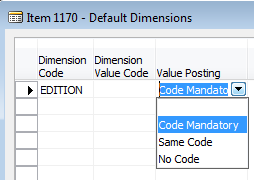 1) Leave the value posting blank. This will impose no requirement for the dimension to be filled out and is the same as not defining a dimension.
2) Choose code mandatory. This option can act in two different ways and is highly useful. If you leave the dimension value code empty, setting the value posting to code mandatory will require the end-user to fill in a dimension value code from the defined dimension code listing before the transaction can be posted to the system. If you fill in the dimension value code with a selection from the list, essentially a default value, any transaction using this item card will populate the dimension value code with the code you have pre-selected as a default. However, if necessary, the end-user can change the value to a different selection.
3) Choose same code. You might think this would be a fantastic option, offering the highest level of control. It is true that choosing same code is the most restrictive. By choosing same code, any transaction must use the code defined in the dimension value code. This can become problematic when your company changes and you need to redefine your default values. Dimensions can be pretty pervasive, getting into places you just didn’t think about when you set them up. For the most part, they’re harmless, just little pieces of data hanging out waiting to be accessed for reporting. But sometimes, when used together with same code, they become vicious nasty little roadblocks. I’ve heard many a horror story of accountants struggling with adjust cost or inventory adjustments or even trying to get sales order postings to finalize because they’re using same code and have needed to make a necessary change.
4) Choose no code. This is the option you choose if you want to tell NAV to never assign a particular code to the item. You could do this if you wanted to reduce the possibility of error from someone trying to apply a dimension that belongs to your customer card to your item card accidentally.
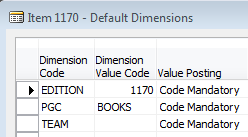 As you can probably tell, my recommendation is to use code mandatory in most situations. It offers the most control over your data while also allowing for necessary flexibility as your business changes. Using code mandatory avoids the problem of “optional” data by requiring some type of data to show up in the dimension value code, whether you put it there as a default to be automatically populated or whether you’ve left it blank so someone down the line can populate it when it is time to make that decision before posting. Using code mandatory can also be a great source of efficiency if you can choose to use default values. If you can decide how to make your dimension postings as automatic as possible, this really can run completely in the background, populating your system with luscious data to be reported on later, with no effort or decision-making required by you. By using default values, you also gain accuracy in your postings since the computer is making the decision the same way every time, whereas you might not be that consistent if you had to define the values manually all year.
Keep reading this month as we continue our series, 15 Days of NAV Dimensions.
Viewing NAV dimensions on postings: where can you see them? (part 5 of 15)
Posted: March 15, 2013 Filed under: Uncategorized | Tags: dimensions, Dynamics, financial statement, global, NAV, shortcut Leave a commentInevitably, once you’ve dipped your toe into the world of dimensions, the next thing you’re going to want to know about is the difference between global and shortcut dimensions.
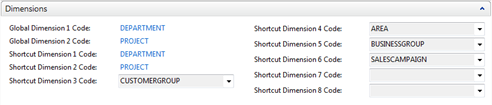 Global dimensions are the two most important dimensions you can choose because global dimensions are the most accessible from anywhere in NAV. They are posted with every transaction you have attached them to, right along side the data, and you can see them on every form as an available choice without having to do anything special. You can see them right along with all your other data in forms (like a sales order or purchase invoice), in journals, in posted history, and global dimensions are even available for selection in every canned NAV report.

A common misconception about global dimensions is that they must be department and project. This simply isn’t so, and in my opinion, is an old holdover from thousands and thousands of NAV demos that use the CRONUS database, where the globals they have used as their demo example are department and project.
The global dimensions your company chooses should be the two most important things your company needs to report on when looking at your financial data. If your company is very customer-centric, maybe one of those globals should be customer related. As an example, if your company groups their customers by wholesale or retail, and uses this designation as a major reporting category when looking at your sales each month (or each day!), you may want to choose this “customergroup” as one of your global dimensions.
If your company is very inventory-centric, maybe one of those globals should be item related. My company has a large number of SKUS, so we find it absolutely essential to relate our global dimensions to our inventory items in order to make sense out of our sales data. We’ve designated a global dimension called PGC or product group category to allow us to group our large list of items into smaller groupings that are easier to digest when we produce reports. In addition, we also use a global dimension called edition that has a one to one relationship with each item we sell. With these two global dimensions, we can look at our sales by large group of items as well as item by item. This comes in mighty handy when it’s time to evaluate gross margin. We can get a macro and a micro view of what’s going on with our gross margin without having to do a lot of digging into the data.
You may have an even different emphasis on what your company needs to monitor. I’ve seen lots of companies who depend heavily on their dimension reporting to allow them to monitor what is going on per salesperson or territory or region. Spend a good amount of time talking this over with your company stakeholders. What really matters? What should you be looking at? Remember too, that just because you are reporting on one measure right now doesn’t mean it’s the right measure to be reporting on in the future. Figure out what those two most important things are, and designate them as your global dimensions.
Shortcut dimensions are what you’ll begin to use once you realize that two dimensions simply aren’t enough! The single largest limitation to shortcut dimensions is that they are not as readily available as global dimensions. They do not have those two designated always there fields that the globals hold. Technically, you can have an unlimited number of dimensions in total, but shortcut dimensions are special because they are more reachable. By designating a dimension as a shortcut dimension, you are making that dimension available as a choice on your forms ((like a sales order or purchase invoice), in journals, in posted history, and in every canned NAV report. The trick is that they don’t show up automatically, and you’ll need to go to the show column area on your forms and purposefully choose them for use the first time.
When you’re looking at posted history, you’ll need to use a new trick to see shortcut dimensions. As an example, choose some transactions from your chart of accounts. You’ll be on the general ledger entry table. Now choose entry and g/l dimension overview. You’ll now get a view that looks like what I’ve pasted below, showing all your shortcut dimensions as well as the global dimensions.

Another perspective on shortcut dimensions is one of efficiency. You will always want to set up a dimension as a shortcut if your end users need to access the field in order to enter or change data on a regular basis. An example of this from my company is our shortcut dimension, team. For all expense accounts, we designate a team in order to track who incurred that expense. My accounts payable person must enter that information for every expense related invoice because the computer simply can’t be trained to make all the decisions she must make in order to determine whose team gets the expense. Team is a shortcut dimension for us because she can set that field up on every form she uses so it is available for her to use for data entry right on the form, keeping her from having to go anywhere else to enter that information.
Keep reading this month as we continue our series, 15 Days of NAV Dimensions.
NAVUG spotter at Convergence: Where will you find supply chain users?
Posted: March 15, 2013 Filed under: Uncategorized | Tags: Convergence, Dynamics, Microsoft, NAV, NAVUG, user group Leave a commentThis year, the NAVUG (NAV user group) is more active at Microsoft Dynamics Convergence than ever before, offering 19 sessions given by end users who use the software every day at their companies! There are plenty of opportunities to attend sessions on supply chain topics and to meet other supply chain end users.
Start off your week on Monday by attending roundtable discussions. There will be a role based table for supply chain and manufacturing personnel as well as an ask your peers table.
On Tuesday, attend a session by Marc Allman, Chief Operating Officer at AMS Controls, and Kevin Fons, Director of Business Systems at Saris Cycling Group, to get tips and tricks for supply planning. On Wednesday, Marc Allman teams up with Heather Allman, Communications Director at AMS Controls, and Bob Bergman, Senior Microsoft Dynamics NAV Consultant with Archerpoint, to conduct an ask your peers session on manufacturing setups. To cap off the week on Thursday, Nancy O’Hara, Director of Business Systems at Shaw Development, and Tom Taylor, Microsoft Dynamics Partner Technology Advisor with Microsoft, conduct a session together on warehousing in Microsoft Dynamics NAV.
NAVUG spotter at Convergence: Where will you find IT and developer users?
Posted: March 14, 2013 Filed under: Uncategorized | Tags: Convergence, Dynamics, Microsoft, NAV, NAV 2013, NAVUG, networking, SharePoint, user group Leave a commentThis year, the NAVUG (NAV user group) is more active at Microsoft Dynamics Convergence than ever before, offering 19 sessions given by end users who use the software every day at their companies! There are plenty of opportunities to attend sessions on IT and developer topics and to meet other IT and developer end users.
The user group gets Monday’s sessions started with three sessions for IT and developer roles. Kali Petit, Systems Analyst Manager at Group O, gets the day going with a session on integrating Microsoft Dynamics NAV with SharePoint, while Kim Congleton, Director IT for Supply Chain Solutions at Group O, gives a session on reporting 101 using the role tailored client. Matt Traxinger, Dynamics NAV MVP and Developer at ArcherPoint, caps off the Monday sessions with database optimization and best practices in Microsoft Dynamics NAV.
Kali Petit is joined by David Long, SharePoint Practice Leader at Tribridge, and Doug Shepard, Director of Information Technology at Augsburg Fortress Publishers, as peer experts for an interactive discussion on getting more out of Microsoft SharePoint and Microsoft Dynamics NAV. Anticipating quite of bit of interest in this topic, the session is offered in time slots on both Wednesday and Thursday.
Also on Wednesday, Scott Rose, VP of Operations at Mirus Bio joins forces with Fria Kurowski, Account Manager for ABC Computers, for a session on how to make a smooth transition when moving from classic to RTC.
To end off the week, there is one last session offered on Thursday for folks looking for an interactive discussion with a peer panel related to upgrade experiences with Microsoft Dynamics NAV. This session makes NAVUG members who are in all different stages of NAV upgrade and implementation available to Convergence attendees to ask questions about what their experiences have been. Peer panelists for this session are David Hatker, VP of IT at CCA & B, Kim Congleton, Director IT for Supply Chain Solutions at Group O, Kerry Rosvold, Corporate Controller at Augsburg Fortress Publishers, and Greg Kaupp, CEO of ArcherPoint.
Don’t forget there are plenty of opportunities on Monday during the time slots for roundtable discussion, with specific tables available for IT Managers, Developers and Programmers. The IT and Developer roles dominate the hot topic roundtables this year covering upgrading, reporting in NAV, integrating NAV with SharePoint, NAV modifications, recent go lives, current implementations, and converting forms to pages.
Why finance and IT need to work in partnership on a NAV dimension strategy (part 4 of 15)
Posted: March 14, 2013 Filed under: Uncategorized | Tags: dimensions, financial reporting, NAV, tips and tricks Leave a comment Who’s responsible for determining which dimensions are used, keeping the database clean, and trouble shooting dimension problems – IT or Finance? The answer really should be BOTH!
While your company’s finance NAV expert has a perspective on dimensions related to financial reporting outcomes, control and consistency of data, and accounting staff efficiency, your company’s IT NAV expert will have a different perspective. Many times, the task of resolving dimension errors, data collection disconnects, and database size and speed fall on the shoulders of your IT team.
By working together on establishing what your company’s strategy is on how dimensions are implemented, used, added, and changed, you can blend the best of both worlds and make sure everyone’s interests are represented. Everyone on the team, no matter what their role, should understand why you’ve chosen to use code mandatory instead of same code and how dimension use for items differs from dimension use for customers. Knowing what your global dimensions are, why they have high priority and visibility in your reporting structure, and how to get your hands on data related to shortcut dimensions is useful to both groups as they formulate new reports for the company.
Keep reading this month as we continue our series, 15 Days of NAV Dimensions.
NAVUG spotter at Convergence: Where will you find finance users?
Posted: March 13, 2013 Filed under: Uncategorized | Tags: Convergence, Microsoft, NAV, NAVUG, networking, tips and tricks, user group Leave a commentThis year, the NAVUG (NAV user group) is more active at Microsoft Dynamics Convergence than ever before, offering 19 sessions given by end users who use the software every day at their companies! There are plenty of opportunities to attend sessions on finance topics and to meet other finance end users.
On Monday, there is a session offered by Robb Delprado, President of Western Data Systems, on fixed assets, and a session on account schedules being offered by Kerry Rosvold (me!).
Robb and Kerry join Dave Wiser, Controller at Tillamook Cheese, and Lee Weiner, Chief Financial Officer at The Bradshaw Group, Inc. as peer experts for two sessions of Ask Your Peers: Finance Professionals, on Tuesday and again on Wednesday.
On Thursday, Kerry returns to do a session on dimensions, and Andy Snook, President of FastPath, offers a session on audit compliance.
All of these sessions are made possible by the NAVUG and the participation of their users! Don’t forget about the roundtable discussions on Monday as well. There are tables planned for CFO/Controllers and Cost Accountants where free discussion will be facilitated by user group leaders. These are great opportunities to meet other end users who use NAV every day, just like you do!
List of official bloggers announced for Microsoft’s Convergence 2013
Posted: March 13, 2013 Filed under: Uncategorized | Tags: Convergence, networking, social media 1 Comment Jon Rivers of Data Masons just wrote this article about how Microsoft is showcasing the role of social media at Convergence 2013. http://www.datamasons.com/blog/2956/the-social-experience-elevating-social-media-at-microsofts-convergence-2013/
I’m happy to announce that I’m also one of the official bloggers on the list this year, and will be joining 11 other bloggers during the conference in keeping attendees in touch with the pulse of Convergence during the week. Microsoft is providing all of the bloggers with Surfaces to keep us mobile, traveling light, and connected and is also providing a Social Media Command Center to give attendees a place to charge devices, sit, and observe or engage in social media activities.
Jon’s article lists all of the official bloggers, make sure to look it over and add these experts to your list of social media sources to watch during the week.
If you haven’t already, and especially if you’re not able to attend this year, subscribe to Dynamics NAV Financials through my email link, RSS Feed, or Facebook page; or for up to the minute updates, follow on twitter @krosvold!
The finance professional’s perspective on NAV dimensions (part 3 of 15)
Posted: March 13, 2013 Filed under: Uncategorized | Tags: dimensions, financial statement, general ledger, NAV, tips and tricks Leave a commentAs the finance person for your company who will make decisions about dimensions, you bring a unique perspective to how dimensions can be valuable in your accounting department. Some of the concerns you have will surround reporting requirements, some will pertain to consistency and control, and others will relate to efficiency. Let’s go through each of those concerns.
Efficiency
As a corporate controller, I’m concerned that my staff work in an efficient manner. In regard to coding invoices or general ledger entries, this means they shouldn’t need to look up a lot of information and they don’t engage in any more data entry than they absolutely have to. When choosing how dimensions will be set up in NAV, you can make some specific choices regarding how data can be populated. Do you want the coding to come in as a default value? Are your coding relationships rule-based enough to make that possible? Are there some things you can populate to always default so the coding appears as if by magic 100% of the time and an employee never needs to be responsible for making a coding decision?
Consistency and Control
In the same way that I’m a stickler about operating efficiently, I’m even more so about having consistency and control. If you ever work with me, at some point you will hear me say, “we do not allow optional data”. This means we don’t gather dimensions for some data and not for others. I use the default value code mandatory a lot in my system. This setting will force a dimension to be populated whether it is through a default value or by a person, but it will never allow the data to come through with a blank value, creating holes and reduced value data in my reporting.
Reporting Requirements
Ultimately, you’re using dimensions in your ERP system so you can get great reporting out of it to make important business decisions. As your company’s finance professional, you know what you’re reporting on now. Take a minute to think about that. Is what you’re reporting on still relevant or is it what you’ve always reported on? Has your business changed? Does your reporting need to change too? Think about what your business really needs to see in its reporting and structure your dimension choices to match.
Keep reading this month as we continue our series, 15 Days of NAV Dimensions.
NAVUG spotter at Convergence: Where will you find international users?
Posted: March 12, 2013 Filed under: Uncategorized | Tags: Convergence, NAVUG, networking, user group Leave a commentThis year, the NAVUG (NAV user group) is more active at Microsoft Dynamics Convergence than ever before, offering 19 sessions given by end users who use the software every day at their companies! For the first time ever, there are two international business sessions being offered by end users. If you are looking to make connections with users who utilize NAV with a global or international emphasis in their businesses, these sessions are the place to be.
Sydney Stroyer is an International Supervisor with Bally Technologies and Jesus Carbajal is Head of Information and Systems at Nissin Foods of Mexico. These two speakers, along with Alexander Lutz, Head of Microsoft Dynamics NAV at metabowerke GmbH, in Germany, will also be hosting a Hot Topics Roundtable on International Installations on Monday.
Don’t forget there is also an International Lounge at Convergence this year, located in the Atrium Cafe, next to the Starbucks.
Microsoft Dynamics NAV: How to Approach an International Deployment UBNAV05 Monday, March 18 1:30 PM – 2:30 PM
Would you like to network and share experiences with users with global deployments of Microsoft Dynamics NAV? If your company is running Microsoft Dynamics NAV in more than one country (or plans to!) join us and share your experiences. We’ll explore how your company has addressed challenges with operating Microsoft NAV on a large scale and/or on a multi-country scale. Share your experiences and in turn listen as peers share their knowledge on international installs. *Hosted by NAVUG*







 Dynamics NAV Financials