Communicating to IT about NAV dimensions and NAV2013 dimension sets (part 13 of 15)
Posted: March 27, 2013 Filed under: Uncategorized | Tags: Account Schedules, default dimensions, dimension sets, dimensions, financial reporting, financial statement, NAV, NAV 2013 Leave a commentToday I’ve got some old news and some new news for you regarding dimensions, but first I need to re-emphasize that finance and IT must be of one mind when it comes to dimensions. As a finance professional, you’ll definitely have your perspective on how dimensions will help you to efficiently produce financial reports with control and consistency. But remember that finance and IT need to work in partnership on a NAV dimension strategy in order to be really successful. One way these two roles must work together is regarding how to get your hands on posted dimension data in NAV. If you’re using NAV only tools to get your data, you won’t need this information, but once you progress to using outside reporting tool packages, you need to know a little bit more to get your collective hands on that data.
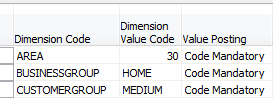 Here’s the old news: if you are using any version of NAV prior to NAV2013, dimensions are kept in a separate table behind your main data. You can see this, though it may not be obvious to you, when you populate dimensions using Ctrl-Alt-D or when you view dimensions through the dimensions button from master data. This table is actually called the default dimensions table (table #352). If you’re using something like SQL for reporting, you’ll need to perform a join between this table and the table(s) to which the data are related. As of today, the large majority of NAV users are using versions prior to NAV2013, so this is important information to have if you’re to get all the data you want into your reports now.
Here’s the new news: With NAV2013, dimension sets are turning dimensions upside down, treating them in an entirely different way, in order to make the way dimensions are stored in NAV more efficient. We’ve all heard the horror stories of ginormous databases with performance problems due to overuse of dimensions. Those stories have always been frustrating to me because it seems we should be able to use dimensions in as robust a manner as we can handle. Well, Microsoft has made a great improvement with the creation of dimension sets. I’ll admit that explaining the mechanics of exactly how dimension sets work is beyond my technical capability, so I’ll hand that off to experts more talented than I. I did get to see a presentation by Jesper Lachance where he showed an example (which he allowed me to share in my recent Dimensions presentation at Microsoft Dynamics Convergence 2013) that shows a twenty fold decrease in number of data items stored by using dimension sets instead of the pre-NAV2013 method.
Faithie Robertson of Archerpoint has a fantastic article A Better Mousetrap! Dimension Sets in Dynamics NAV 2013 (Navision) which does a really great job of explaining exactly what a dimension set does differently.
If you’re looking for a textbook explanation, visit MSDN on their page Dimension Set Entries Overview.
Encore Business Solutions has an illustrated guide NAV 2013 – Dimension Sets.
You can see why, with dimensions being stored in a separate table, and with dimension sets showing up as a new improvement, everybody on the team needs to understand how dimensions work, where they’re kept, what your particular company conventions are, and how you’ll report against them accurately and effectively. I haven’t heard a lot of feedback yet from end users about how working with dimension sets is working for them and whether it is making reporting better or challenging in different ways. But, the feedback from programmers, developers, and database administrators has been a resounding: THANK YOU MICROSOFT!!!
Keep reading this month as we continue our series, 15 Days of NAV Dimensions.
NAV dimensions in budgets and consolidations (part 12 of 15)
Posted: March 26, 2013 Filed under: Uncategorized | Tags: Account Schedules, budgets, Classic Client, consolidation, dimensions, financial reporting, financial statement, global, NAV, shortcut Leave a commentNow that you know you can view dimensions on postings and in financial reporting though account schedules, let me show you how you can utilize dimensions in budgets. NAV budgets opens up a few more possibilities for you where dimensions are concerned. Take a look at this screen shot, using the classic client, that shows clearly what the available dimensions are in budgets.
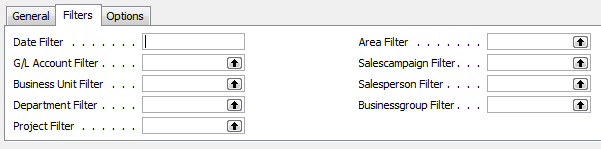 If you look at the left side, you can see the persistent global dimensions of Department and Project which the test database for Cronus uses. Just like all areas of NAV, global dimensions are available everywhere, even in budgets. On the right hand side, you can actually see four more dimensions. These are shortcut dimensions and if you count, you can see you’ve got a total of six dimensions available with NAV budgets to use for your planning process. As long as you budget for a dimension then you can report actual versus budgeted against that dimension.
In addition, you can also see there is a field called business unit filter, which I’ve always counted on as a “bonus” dimension. This field becomes useful when you have multiple companies in NAV and use them to consolidate your financial statements. I’ve got a very simple setup where I have two companies and a consolidation company. When I consolidate my statements monthly, and when I load my budgets, I designate the business unit filter for each of the two companies so I can report on them individually as well as together, on a consolidated level. Because I use separate companies with the business unit filter I don’t need to use a dimension to designate company for my financial statements.
Keep reading this month as we continue our series, 15 Days of NAV Dimensions.
NAV dimensions in account schedules (part 11 of 15)
Posted: March 25, 2013 Filed under: Uncategorized | Tags: Account Schedules, Analysis Reports, analysis views, dimensions, financial reporting, NAV Leave a commentWe’ve spent a good deal of time talking about how to get dimensions into your financial data, now we need to talk a little bit about how to get that information back out in the form of reporting. One of the most direct ways to get financial reporting out of NAV is by using account schedules, which are the native NAV financial reporting package that report on general ledger transactions. Account schedules naturally access the two global dimensions for financial reporting in all cases, as shown below in the old classic client.

By applying analysis views to an account schedule, you get to choose any four of your dimensions, in any combination, to use for your financial reporting. This gives you much more flexibility and power in your financial reporting, allowing you to look at your financial data in many different ways. The most important thing to remember about analysis views is to keep them updated, whether you do this manually or in some automated way.

There are also tools like analysis by dimensions and analysis reports that can be used along with dimensions. For more information see this post Where can I learn more about NAV analysis reports and analysis by dimensions?
Keep reading this month as we continue our series, 15 Days of NAV Dimensions.
You’ve seen the future, it’s time for the NOW
Posted: March 25, 2013 Filed under: Uncategorized | Tags: Convergence, NAVUG, user group Leave a comment I can’t agree more with the recent post Suzanne Scanlan posted regarding the connection between Microsoft Dynamics Convergence and the NAVUG Forum. Convergence is a great view of the future, but NAVUG Forum hits us where we live – in the now. It’s the one opportunity I have every year to connect intimately with my NAV community. For three of four days we live, breathe, and even dream NAV because we get the chance to immerse ourselves in learning about and solving business challenges with our primary tool, NAV. The really great thing is we get to learn from each other! Volunteer end users present the majority of the sessions, so you know the information you’re getting is coming from someone who uses the software every day, just like you do, and likely in the same version that you are using now. I love to see the bright shiny vision of the Microsoft future at Convergence, but on a practical level, I won’t be arriving at that point in time for at least two years. The material I consume at NAVUG Forum is immediately applicable to what I’m facing in the now.
If you’re looking for info about the upcoming 2013 NAVUG Forum held in Tampa, FL October 21-25 check out these links.
Examples of content offered at the 2012 NAVUG conference
Resolving NAV dimensions errors (part 10 of 15)
Posted: March 22, 2013 Filed under: Uncategorized | Tags: code mandatory, dimensions, Dynamics, errors, Microsoft, NAV, tips and tricks Leave a commentError messages related to dimensions can be the bane of a dimension-using NAV user’s existence unless you know how to properly deal with them. The number one thing I tell my end users is, “if the error message has the word dimension in it, the error is generally something you can resolve yourself”. Let’s go through three dimension errors from my system; we’ll resolve each one as we go.
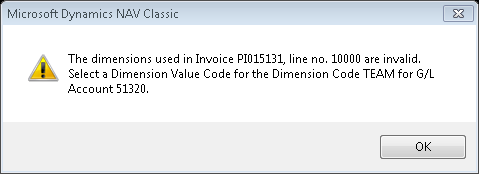 This message says the end-user needs to select a dimension code for team on the first line of this invoice, where they’ve entered general ledger account number 51320. For whatever reason, NAV counts lines by the 10,000, so 10000=line 1, 20000=line 2, etc. The rest of the error message is pretty self-explanatory, but is presented in an “out-of-order” way that doesn’t quite read as well as plain English. This error has occurred because we’ve set a control on the general ledger account 51320 of code mandatory for team. The end-user needs to enter a team code for every transaction that posts against this account number.
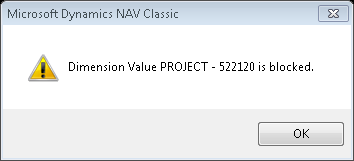
The dimension value of 522120 on the list of dimensions for project has been blocked. You can’t use it/you don’t want to use it/you shouldn’t use it. Our company goes through annually and blocks project numbers that have not been given any budget money. If I block a project, I mean it – I really don’t want anybody posting anything against it. For this error, either the person made a typo, or they were given bad coding so the solution is to either fix the typo or get a correct project number.

This is an example of a team and project combination that has been blocked for use. We do this on purpose in order to keep from making errors and to avoid needing to make reclassifying entries. For this error, the person entering the information either needs to correct a typo or get a correct project number (or team number).
Keep reading this month as we continue our series, 15 Days of NAV Dimensions.
NAV dimension priorities (part 9 of 15)
Posted: March 21, 2013 Filed under: Uncategorized | Tags: dimension priorities, dimensions, Dynamics, Microsoft, NAV, tips and tricks Leave a commentHere’s the deal with dimension priorities. Depending on what you’ve chosen for your dimension strategy, an entry could have more than one dimension proposed at the time you post it. When this happens, NAV needs a way to break the tie, and that way is dimension priorities.

This handy-dandy table allows you to be in control by choosing which table will take priority over the other if NAV is forced to choose. What happens if you don’t define the priority? This is where NAV’s built-in tie-breaker comes in. If you don’t define the priority, NAV will choose the table with the lowest Table ID number.
One sure way to avoid needing to do this at all is to think through your dimension strategy really carefully before you commit to it. If you define team as a dimension on both your customer master data and your item master data, and you give a customer and item different default dimensions, what’s going to happen when you post a sales order? You’re going to get a conflict where the system has to choose. Think through your strategy and I bet you can find a way to make sure that team only corresponds to customer and you could give a different dimension designation to item. By doing so, you’ve automatically designed your system not to have a conflict in the first place.
Keep reading this month as we continue our series, 15 Days of NAV Dimensions.
NAV dimension combinations for additional accuracy (part 8 of 15)
Posted: March 20, 2013 Filed under: Uncategorized | Tags: dimension combinations, dimensions, Dynamics, Microsoft, NAV, tips and tricks Leave a commentOne way to get additional accuracy out of your NAV dimensions is to assign dimension combinations. Dimension combinations are really good for two things: 1) to keep you from posting something that simply doesn’t belong where you’re putting it, and 2) to keep you from posting a combination of dimensions together that don’t belong together. Let’s go through a couple of examples.
Say that, according to your dimension strategy, you’ve designated the dimension team to go with customer master data, and the dimension edition to go with item master data. If you don’t want team to ever be allowable together with edition, set a dimension combination of blocked on the grid where the two dimensions intersect.
Another example is something we do at my company. We rely very heavily on budgeted information and budget all of our product development expenses with two dimensions assigned: team and project. Each team has their own list of assigned projects and no team should ever share a project. In order to keep ourselves from having a lot of reclassification entries, we assign a dimension combination of limited on the grid where team and project intersect. 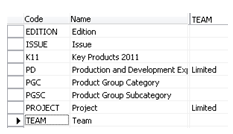 This setting allows us to further drill down and define which projects belong to which team. If we receive bad coding or even just enter a project number incorrectly, if that project number is not one on the “approved” list of project dimensions assigned to that team, we’ll get a message that lets us know we’ve made an invalid choice before we post it into our system permanently.
Keep reading this month as we continue our series, 15 Days of NAV Dimensions.
NAVUG spotter at Convergence: general session highlights
Posted: March 19, 2013 Filed under: Uncategorized | Tags: Convergence, Microsoft, NAV, NAV 2013, sicily Leave a commentThis years’ general session didn’t start out with rock and roll music and surfboards, but rather cool Jazz and low key presentation by Jesper LaChance and Eric Tiden. Tiden is the new NAV R&D General Manager, and has some big shoes to fill after dynamic Dan Brown left last year. New to the NAV space, but not ERP management, Tiden said “it’s really unusual to hear people say things like “I LOVE NAV” when they’re talking about their ERP, and it’s a great responsibility to live up to!”
LaChance and Tiden kicked off the general session with celebration of stories from customers who use NAV including Habitat for Humanity, Slainte Healthcare, and All for Kidz.
It seems the theme for the session was “NAV2013 is the greatest release every (and you should upgrade)!”, and LaChance and Tiden repeatedly stressed this point and then backed it up with demos of:
- the president role from the role center, highlighting use of charting based on account schedules which can be controlled by the end user without partner assistance
- new assemble to order capabilities shown using the NAV web client
- refreshable Excel information into and out of NAV, powerview wth ODATA, an Jet Express
- a preview of the Sicily release using a Surface with the web client, Office 365 and SharePoint integration
A quick listing of next NAV version “Sicily” with a 2014 date revealed improvements to cash management, “a lot more” integration with office 365, better support for large scale hosting, and UI web services.
Customer response to the session seemed a bit luke-warm, with only scattered applause from time to time, but the room did respond well to the customer success stories, nodding and laughing, and managed to perk up at the end when given information to access a free NAV2013 Azure demo for a limited time.
NAV default dimensions and value postings on the chart of accounts (part 7 of 15)
Posted: March 19, 2013 Filed under: Uncategorized | Tags: Account Schedules, chart of accounts, code mandatory, dimension value code, dimensions, Dynamics, financial reporting, master data, Microsoft, NAV, tips and tricks, value posting Leave a commentValue postings on the chart of accounts are your next line of defense to ensure a solid dimension strategy execution. You could probably be content by only applying value postings to your master data, but by adding value postings to your chart of accounts in addition to your master data, you are adding a layer of consistency and control into your transactional posting.
But what could go wrong, you might ask? How would the value postings on your master data fail you? If you are using code mandatory with a default value posting, what could possibly go wrong? Here’s what could go wrong – you could forget to populate the dimensions on a new master data item. Let’s say you set up a brand new item, or maybe a big group of items; how about a whole season’s worth of new items? You set them up and forget to populate the dimensions on them. You could go days, weeks, even months (hopefully not if you’re watching your financials) with these new items merrily populating your system with blank dimensions compared to all of your other items that are populating with default dimensions. Once you catch the error, you’ll need to track down all those blank pieces of data and do journal entry reclassifications to all the effected accounts, with all the effected dimensions, in order to fix your financial reporting.
[Sidebar: Easiest way to do this is to run an account schedule covering the effected accounts with the dimension filter set to ” (that’s two single quotes, the symbol for blank in NAV). You can then see every transaction that’s posted with a blank dimension, and use that to construct your correcting journal entries.]
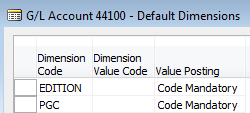 If you’d like to avoid all of that pain, set up value postings on your chart of accounts. Here’s the trick: your should not use a default dimension value code together with your value postings. What you want to accomplish with this is to have your chart of accounts act as a control point for your postings. If your chart of accounts carry a code mandatory on the accounts, they are requiring that they receive dimension data from the master data card before they will allow any transaction to post to them. So, what happens when that rogue item with no dimensions tries to post through? The code mandatory setting on the general ledger account prevents it from posting, ensuring you never end up with any blank dimension postings in your transactions.
Keep reading this month as we continue our series, 15 Days of NAV Dimensions.
NAVUG spotter at Convergence: Monday highlights
Posted: March 18, 2013 Filed under: Uncategorized | Tags: Convergence, NAVUG, user group 1 CommentUser groups have been the word(s) of the day for Monday! Sessions on fixed assets, NAV integration with SharePoint, reporting with the RTC, account schedules, database optimization, and international deployment were all sessions delivered for NAV end user attendees by NAVUG members. Despite jet lag, nerves, uncooperative database connections, and the ever-present challenge to make it to the right room down some loooong hallways, volunteer end user presenters did a great job of sharing vital information and attendees did a great job of asking questions.
Roundtable discussions seem to be a rousing success with the only flaw being that we have more attendees than chairs. It was not uncommon to see attendees sitting around a table with one ring of attendees standing behind them, and another ring behind that group! I saw lots of business cards flying and people making connections with folks who use NAV in their jobs every day, just like they do. Around the CFO and Controllers table, the hot topics of the session were upgrading and BI and reporting, perennial NAV topics that end users still struggle to agree on. Other NAV hot topic tables were: currently implementing companies, converting forms to pages, ask your peers: supply chain, international installations, and professional service companies. 
The long registration lines have subsided, and the hallways and Expo hall are full of attendees continuing the conversations they started earlier in the day. As we move into the evening, I can hear Cajun music starting and smell the food being put out for the first reception of Convergence 2013.







 Dynamics NAV Financials