Tis the (Budget) Season! Three handy NAV account schedule tips to get you through
Posted: October 23, 2012 Filed under: Uncategorized | Tags: Account Schedules, budgets, column layout, NAV, row setup, tips and tricks Leave a comment I don’t know about your company, but my company is in full budget preparation mode. We’re working on getting our sales forecast and operating budgets put together in time for the end of year. Like most companies, we’re working on this predictive tool while we’re in the midst of finishing out the year, so of course, we get to make a few assumptions on how the year will end up. I don’t have a crystal ball, but I do have some pretty great account schedules that help folks at my company get a good solid look at where we ended up last year, what we planned for this year, and how we’ve done over a couple of years, and I’m going to share those three account schedule column layouts with you today. Hopefully these simple setups will give you some quick ways to wow your company and make their budget construction process easier.
Tip 1: Show 12 months of actual data
We ask our budget managers to give us a twelve month prediction, why shouldn’t we give them twelve months of data to work with? No matter what month you’ve just closed, you can quickly put together an account schedule that shows all of the completed months for the year (in this case, January-September) as well as October/November/December of the prior year. This way, if your activity is generally the same year over year, budget managers can get a quick gauge from this setup. Keep in mind this column layout isn’t dynamic, so it’s not a true rolling twelve months. For budgeting purposes, it’ll get you what you need.

Tip 2: Show 9 months of actual data and show what the plan is for the last three months of the year
Another way to provide a projection for the year is to show all the completed months for the year (again, January-September) and then show the budgeted plan for October/November/December. This method shows actual activity as well as three months of planned activity in order to project the total for the year. If activity this year is significantly different (higher or lower) from the year prior, you might depend on this view instead.

Tip 3: Show a whole bunch of history at a high level
Especially for sales forecasting, it sometimes gets difficult to look at too much data at once. One way to get past data analysis overload is to provide a few years’ worth of annual data. This column layout will give four years of data, helping you to compare not only year over year, but multiple year trending in your data.
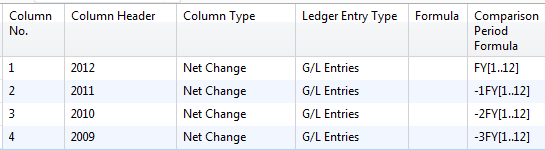
All three of these tips should give you a few additional tools to help you make sense of a whole lot of data. They can be applied to almost any row setup you have whether that setup is related to revenue or expenses. If you’re looking for more formulas, visit the account schedule formulas page.
Happy Budgeting!
This posting is one of the Top 20 Most Viewed in the last year! Follow this link to see the entire list.
Challenge to the NAVUG Community: NAV Account Schedules formulas cheat sheet
Posted: October 15, 2012 Filed under: Uncategorized | Tags: Account Schedules, challenge, cheat sheet, formulas, NAV, NAVUG, NAVUG Academy, tips and tricks, user group Leave a comment I had the opportunity today to teach a full day class on account schedules to an amazing engaged group of people! I get the privilege of doing this in person once a year at NAVUG Forum thanks to NAVUG Academy. In the last year, I’ve branched out to teach this same class in webinar format, and boy has it been a blast. The number one question I get is, “Do you have a cheat sheet for all the formulas you can use in Account Schedules?”
I’ve shied away from this in the past, because it’s a complex question. You’ve got to take into account comparison period versus comparison date, column type used, use of filters, and like all Microsoft products, there is often more than one way to accomplish the same result. But I think I’ve got us a start with the page I’ve just put out on my blog.
I believe the power of community is an amazing thing. We continually make each other better by sharing information.
I CHALLENGE YOU TO SUBMIT A COMMENT WITH AN ACCOUNT SCHEDULE FORMULA THAT’S NOT YET BEEN LISTED.
As long as I can test it to prove it works in the way described, and it’s different enough from already listed formulas, I’ll add it to the list and make sure to put a shout out to the contributor on the blog.
I’m looking forward to seeing what our amazing NAVUG community can accomplish!


Ready, get set, network! NAVUG Forum is prime time for making connections.
Posted: October 9, 2012 Filed under: Uncategorized | Tags: CardMunch, community, Forum, LinkedIn, NAVUG, networking, Qrious, user group 1 Comment It’s less than a week before we get to show up in Seattle for NAVUG Forum to connect with other professionals who use NAV in their jobs every day, just like we do! I’m making my “gettin’ ready to network list” and thought I’d share. These are my networking essentials:
1) Get that LinkedIn profile updated. Put a new picture up there so folks will know what you look like today. I like to go professional for me, but I don’t mind seeing a casual picture out there of other folks, so long as it’s current and helps me to recognize them. Almost anything is better than a blank photo spot. Make sure your basic info is updated, and you’ve got your top 10 skills and expertise out there. Another good reason to do this is, for the first time ever, the user group will be using Qrious, a phone app that will allow you to scan QR codes on attendee badges to get you to their designated contact information. That could be a company website, a blog, a Twitter or Linked in profile, or whatever they direct you to.
2) If you’re not a regular Twitter user, brush off that account and make sure you’re ready to use it. A lot of fun things can happen in the NAVUG Twitter-verse during Forum; it’s a great way to know what’s going on, where folks are at, and what the big WOWs of the day have been.
3) Updated business cards. I’m going to go out on a limb and say that the old business cards are racing toward obsolescence, but they’ve got their place, and I still use them. They’re a quick way to get information into someone else’s hands and promote your company.
4) Spend some time reviewing contacts you’ve made in the past. I had an old dog-eared stack of business cards that graduated to a box because I couldn’t hold them all anymore. Once I got to that point, I got organized with CardMunch, an app that allows you to scan the card with your phone and then uses Mechanical Turk to transcribe the card into a contact record and locate the person’s LinkedIn profile, if they have one set up. You can even add notes to the record, just like writing on the back of a business card. I can flip through images of the actual cards, or the profiles I’ve gathered, when I’ve got a few extra minutes. Highly recommended.
5) Charging Cords! There’s no bigger bummer than to have your phone go dead in the middle of all the action.
6) A pack of your favorite breath mints. For real now, none of us are getting enough water, we’re eating stuff we don’t normally eat, probably not getting enough sleep, and we’re in close quarters all day. A mint never hurts, and it’s nice to be able to offer one to someone else.
7) The list of people you want to meet, even if you don’t know who they are yet. Every conference I make a list. Sometimes, I’ve got a person’s name on the list with a note “follow-up about the comment on ACH procedures with Lee”. Other times, I’ve got a note “find someone who knows about managing VAT with mixed standard and zero-rated items on consignment”. I’ll even throw in some “stop by the help desk and brainstorm that new idea on managing dimensions” or “informally poll finance users to see if they’d be interested in webinars on AP best practices”.
8) Adjust your attitude to be ready to interact. Lots of the folks who attend Forum are IT and Finance professionals. You’ve gotta admit, we don’t always have the best reputation for extroversion. Make it a part of your mindset to mentally get out from behind your computer (or your phone). Meal times and break times are prime time to get discussions going with a few people at a time. Take note of someone in a session who asked an interesting question, or who looked puzzled, or maybe who looked like they didn’t know anyone yet. Make eye contact, smile, and ask questions.
7) Comfy shoes. What do shoes have to do with networking? When I’m having my last conversation after talking with folks all day, I don’t want to be shifting around because my feet hurt and I’m sure not going to let sore feet get in the way of making it across the Expo hall one more time because there is one more person on my list I need to find.
8) Prepare to follow-up later. Don’t let all this prep go to waste! Even as you’re meeting new folks, remember that you’ll want to follow-up with people once you get back home. It’s always nice to hear from someone you met, and to establish a connection with someone who really understands what you do professionally. You never know now how you might be able to help them, or how they might be able to help you. The opportunity we all have to build an engaged community of NAV users who help each other exists because we all show up ready to connect, learn, and share.
See you in Seattle!
Expand your use of dimensions in NAV account schedules by using analysis views
Posted: October 2, 2012 Filed under: Uncategorized | Tags: Account Schedules, analysis views, budgets, Classic Client, codeunit 410, column layout, date compression, dimensions, Dynamics, Microsoft, NAV, row setup, RTC, update Leave a commentIf I had to pick only three basic elements to Microsoft Dynamics NAV account schedules, I’d have to choose row setups, column layouts and analysis views. Of course, row setups give you access to basic general ledger accounts and column layouts give you options on how to show that data in different time periods. So what do analysis views do for us? Analysis views give us the ability to reach into our dimensions, past the two globals, and into the list of shortcuts, allowing us to combine any four dimensions we want at a time in any account schedule.
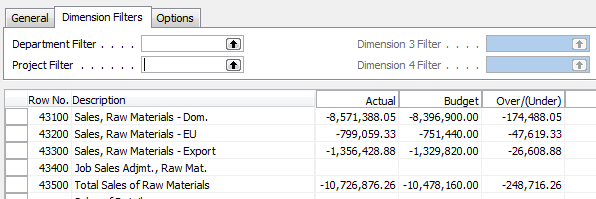
For illustration, I’m showing you an account schedule from NAV2009 Classic, which shows the dimension filters on an account schedule where no analysis view has been applied. The two global dimensions for CRONUS USA (Department and Project) are available to be selected on the dimensions filter tab and the remaining options are greyed out, unable to be used.
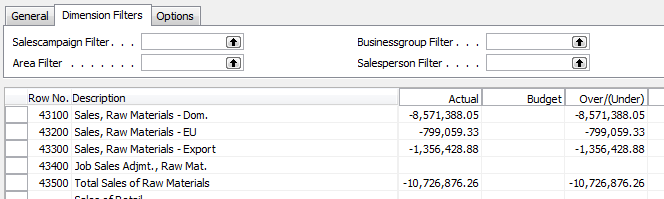
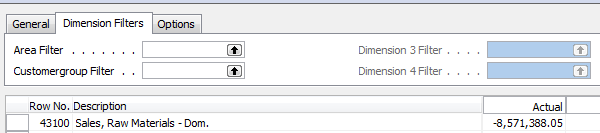
By selecting a different analysis view on the account schedule name page, you will have expanded options. Perhaps you’d like to apply an entirely different set of dimensions filters to your account schedule or limit the dimensions filters to only two of your shortcut dimensions. Any combination of four dimensions is available to you through analysis views.
There are a few things you need to know about analysis views before you start using them:
You can add a default analysis view to any account schedule. If you always want a certain account schedule to filter on a selected group of dimensions, this is the best way to do this.
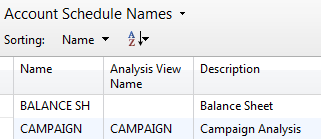
Analysis Views must be updated. You can do this at any frequency you wish. Some companies choose to update once a month, some companies update once a day. Be aware that the process of updating pulls in any transactions that have been posted since the last update to your analysis view. This means if you post some entries during your close process, you’ll need to update your analysis view in order to show the change on your account schedule.
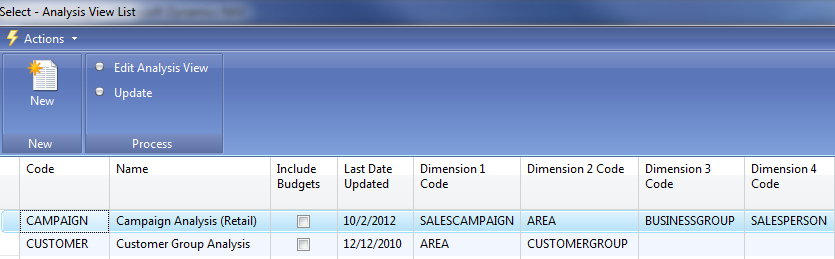
Updating can be done manually or it can be automated. To manually update analysis views, just hit the update button. You’ll need to do each one separately. Alternatively, you can choose to schedule codeunit 410 Update Analysis View as a regularly scheduled maintenance item in order to automate this process.
When you set up an analysis view for the first time, it can take a long time to update. Depending on the size of your database, if you don’t limit how far back your update goes, it could take a long time to update initially. Be careful by trying this out in a test system first. This process, which will normally take seconds when run daily, will take many hours if you don’t limit it and will cause table locks for other users.
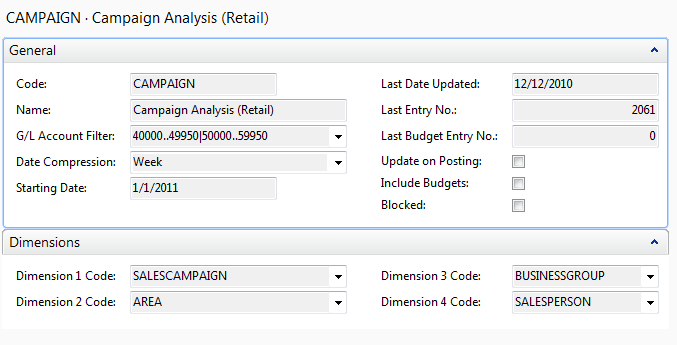
If you test out an update and are afraid it will take up too much processing time, you have a couple of options. First, you can limit the start date of your update. One reason you might need a new analysis view is because you’ve added a new dimension. In this case, you really don’t need to go back to the beginning of time on your update. Choose the date you started gathering data on your new dimension as your starting date. You can also choose date compression. By compressing your data by day, week, month, quarter, period, or year, you limit how much detail you can see when you drill down. If you use this option, you’ll need to remember that this is a compressed view if you change column layouts to different time frame than your compression setting. Choosing date compression of none will allow you to drill down to full transactional detail.
Avoid using the update on posting button. This option updates your analysis view every time you post something to your system. Every sales order, every sales tax entry, every cash receipt, etc. will update real time. I’ve seen one small company use this option and it brought their system performance to a crawl.
Remember to include your budgets. If you make any changes to your budgets, you need to update that information on your analysis views as well.
Business Intelligence and Reporting Track helps solve user challenges at NAVUG Forum.
Posted: September 24, 2012 Filed under: Uncategorized | Tags: analysis views, business intelligence, Dynamics, JET, Microsoft, NAV, NAV 2013, NAVUG, reporting, RTC, user group Leave a commentJason Chance, Senior Programmer/Analyst at Seventh Generation and Business Intelligence and Reporting Track Leader for NAVUG Forum, guest blogs today on what the BI and Reporting Track has to offer end users at NAVUG Forum, the annual NAV end-user conference held in Seattle, October 15-18 2012.
 Without fail, whenever I lead a NAV roundtable discussion or training class, people talk about the reporting. I’ve only met a handful of people who are completely happy with their business reporting and most of them have spent significant resources developing reporting solutions outside of NAV. But before you throw in the towel on reporting in NAV, and spend a lot of time and money, you owe it yourself and your organization to understand what’s available in NAV. This is where NAVUG Forum 2012 comes in.
NAVUG Forum is an excellent event led by NAV users and professionals. It’s not a sales pitch. It’s not a glossy brochure full of fluff. It’s real NAV users sharing their experience and insight gained through years working with NAV. In the reporting and BI track we’ll focus how you can get the most out of the existing tools in NAV. With sessions like Reporting 101 and Reporting 102, you’ll learn how to create and modify NAV reports. Sessions on the Role Tailored Client will show you how to use the RTC to customize the data that you see in NAV. The Analysis Views and Jet Reports session will highlight two often under utilized reporting tools in NAV. The NAV 2013 sessions will give you a preview of what to expect in the newest version of NAV.
If you have issues and concerns with your reporting capabilities, chances are someone else has the same concerns, who knows, maybe they’ve already solved their problems. Come to NAVUG Forum, learn from your peers, build a network of colleagues that can help you get the most out of NAV.
See you in Seattle.
Microsoft’s concept of how 2019 will look like
Posted: September 21, 2012 Filed under: Uncategorized | Tags: Dynamics, Kinect, Microsoft, NAV, video demo 1 CommentMicrosoft Dynamics NAV users have already gotten the chance to see Jesper Lachance Raebild’s video demo using Microsoft Kinect in a NAV manufacturing environment. If you missed it, find the link to the video here.
What else does Microsoft have in store for us? Take a five minute break to see what 2019 could look like.

The NAV accountant’s little helper: the reconciliation account check box
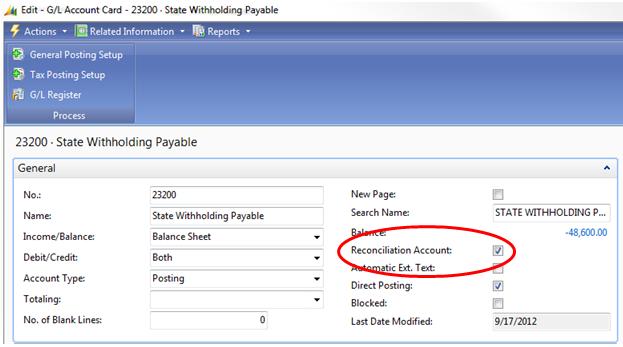
Posted: September 18, 2012 Filed under: Uncategorized | Tags: balance after posting, Classic Client, general ledger, journal entry, NAV, net change, posting test report, reconciliation account, RTC, tips and tricks Leave a commentThere’s a tiny feature in NAV that I take for granted. It’s there, in the background, hiding in the setup, and it helps me out just a little almost every time I make a manual journal entry. Especially if I’m in a bit of a rush, or distracted, this option gives me one more quick but effective look at what I’m doing before I commit a journal entry to my books permanently. This nifty little thing can be added to your NAV setup at any time without any help from IT and won’t require any maintenance. The option I’m talking about is the Reconciliation Account check box you can find on your general ledger account card. Here’s where you can find it:
Role Tailored Client
Classic Client
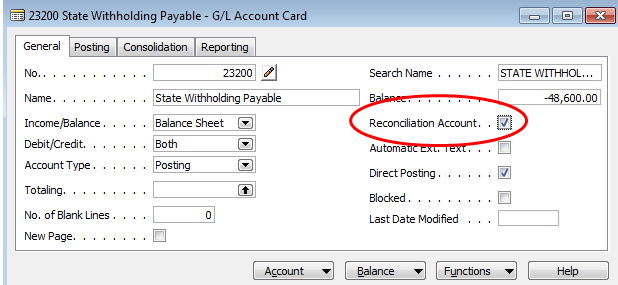
For any account where you’d like this additional double check, check the Reconciliation Account box found on the General Ledger Account Card. Now go put together your journal entry.

Instead of posting directly from the entry, choose Actions=>Posting=>Test Report=>Preview (if you’re RTC) or just choose Posting=>Test Report=>Preview (if you’re Classic). NAV will put together a handy dandy print preview which will now include a section at the bottom labeled Reconciliation. This little section will show you which direction your entry is going in, what sign your ending balance will be, and what the actual balance after posting will look like. This all happens before you commit it as final to the system. This may be just the extra bit of help you need in order to keep you from making an error. If you like what you see, post that journal entry!
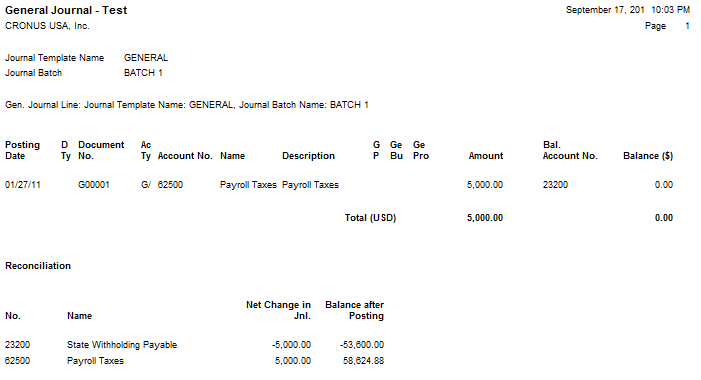
If you have an account where you’ve got a lot of daily activity, you may not find this as useful as you do with accounts with just a little bit of activity throughout the month because you’ll have a more frequently changing end balance. Decide what might be useful to you.
Next time you do a journal entry, give it a try. Go to the account card and check the box. Make your journal entry. Before you post, run the posting test report. Is the net change in your journal entry going in the right direction? Did you enter the correct account? Is your ending account balance the right sign? Most importantly, is the balance after posting what you expected? This little helper can give you a quick preview before you hit post and save you from having to reverse and correct an entry.
This posting is one of the Top 20 Most Viewed in the last year! Follow this link to see the entire list.
10 easy tips for payment terms success in Microsoft Dynamics NAV
Posted: September 13, 2012 Filed under: Uncategorized | Tags: accounts payable, accounts receivable, aging, customer, discounts, document date, due date, Dynamics, immediate, invoices, Microsoft, NAV, payment terms, suggest vendor payments, tips and tricks, vendor Leave a comment1.  Know that the Document Date is what controls the calculation of payment terms. This is true for both vendor invoices as well as customer invoices.
2. The vendor and customer areas share the same Payment Terms setup. Make sure the folks who maintain these tables know they’ll need to share the codes that are set up here.
3. Basic terms use very basic setup. Payment terms of Net 30 simply require a Due Date Calculation of 30D in order to work.
4. Immediate payment terms can be accomplished in two ways. The first way is to leave the payment terms field blank on the vendor or customer card. When this occurs, NAV makes the assumption that the payment terms are immediate. The second way is to populate the Due Date Calculation with 0D. By putting in zero days, you can still define a payment term and name it as immediate. I don’t like to see blank fields in any of my data, so I recommend using this method.
5.  Discounted terms follow a specific combination in the payment terms table. For discounted terms like 1/10 Net 30 (one percent discount if paid in ten days, otherwise due at thirty days), use this setup.
6. You may have some things you always pay on the first of the month, like rents. How do you get invoices to show up on your payables aging on the first day of the month regardless of whether the month has 31, 30, or 28 days? In the due date calculation, use this simple formula: CM+1D.
7. If you send checks, and you need for that first of the month payment to get in the mail in time to be received on the first, get a little fancier with the formula and use CM-3D. This will calculate the due date as the third to last day of the month, no matter how many days are in the month.
8. If you need to date something as always due the last day of the month, set up the Due Date Calculation as D31. This will always calculate the due date on the last day of the month, regardless of how many days the month has.
9. When running the suggest vendor payment process for payables, the last payment date corresponds to the due dates calculated by the payment terms. The date you put in this field will suggest payments to be made with due dates up to and including the date listed.
10. If any invoice gets posted with incorrect payment terms and you need to correct the due date in order for it to show up properly on your aging, you can go in and correct the due date on the already posted invoice. This can be done from the end-user level and does not require use of the object designer. Drill down to the correct invoice record from the Balance ($) field found on the general tab of the vendor card. Use a triple-click with your mouse on the due date field to change the date quickly and easily. The same steps can be accomplished from the customer card.
This posting is one of the Top 20 Most Viewed in the last year! Follow this link to see the entire list.
Basic column layout options for NAV Account Schedules
Posted: September 10, 2012 Filed under: Uncategorized | Tags: Account Schedules, balance at date, Classic Client, column layout, comparison date formula, comparison period formula, financial statement, fiscal year, general ledger, NAV, net change, RTC 5 CommentsColumn layouts in NAV account schedules are what you build to add more flexibility to your financial statements. You can have an unlimited number of column layouts to match together with your already existing row setups. In general, most basic row setups contain general ledger numbers and column layouts contain dates. As an example, when I produce my income statement, I will have one row setup that reflects a summarized income statement and at least four different column layouts that reflect different configurations of month to date, year to date, comparisons against budget, and twelve month trended views.
Just like with row setups, there are many available options in the column layouts. This large variety of options can sometimes be overwhelming to the new account schedule user. I’ll show you which columns to choose in the column layouts for account schedules as a beginning point, and go through some simple explanations of how they are used.
Fields to start with:
Column No. – The column number is completely optional, but highly recommended. This simple element of the column layout will eventually be one of the key features of your account schedule, allowing you to calculate and organize with ease.
Column Header – This is where you’ll define, in words, what you’re showing in each column of your report. Keep it short; there is a 30 character limit.
Column Type: Net Change, Balance at Date, or Formula – There are actually seven options to choose from here, but I recommend that you limit yourself to these three when you’re just getting started. The key here is knowing what type of accounts you’re reporting on. If you’re using income statement accounts (Revenue/Expense), then you need to use net change. If you’re using balance sheet accounts (Assets/Liabilities), then you need to use Balance at Date. Formula allows you to perform calculations in a column.
Ledger Entry Type – This column will allow you to define what type of ledger entries you will show. This is where you can choose actual general ledger entries or budgeted general ledger entries.
Formula – If you’ve chosen Formula as the Column Type, this is where you’ll put the formula.
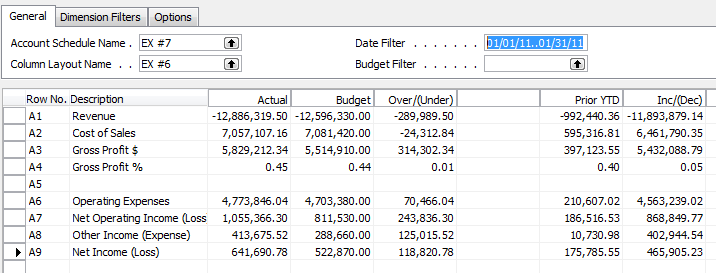
Comparison Period Formula – This column allows you to define date formulas that are used to calculate the amounts shown. I generally recommend that beginning account schedule users start out using the comparison period formula field instead of the comparison date formula field. The comparison period formula field references the accounting periods set up in the fiscal year, so this option seems the most consistent, and is especially necessary for companies that may not follow a calendar fiscal year. Common data labels used in this field are CP for current period or -1CP for previous period and FY for fiscal year or -1FY for prior year.
Shown below are both the design view and the user view of a column layout for a summarized income statement showing year to date and prior year to date information in the columns to demonstrate the use of these six basic options in an account schedule.
Role Tailored Client

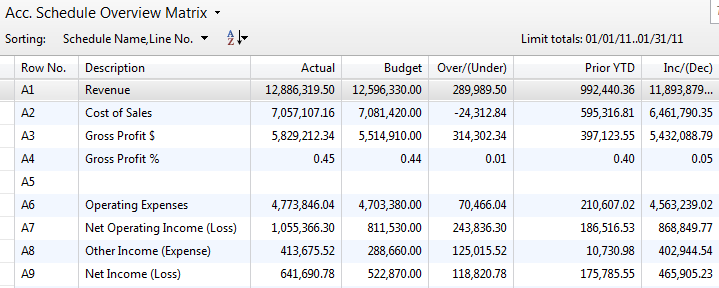
Classic Client
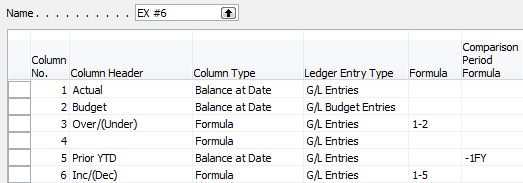
For more information on row setups, please see these posts: Basic row setup options for NAV Account Schedules and Complete row setup options for NAV account schedules.
If you’re just beginning to use account schedules, see Getting started with a new account schedule.
This posting is one of the Top 20 Most Viewed in the last year! Follow this link to see the entire list.
NAVUG FORUM 2012 Overview and IT Track – Keyword: WOW!
Posted: September 6, 2012 Filed under: Uncategorized | Tags: NAV, NAVUG, user group Leave a commentLewis Rosenberg, Information Technology Manager at Mars Fishcare, Information Technology Track Leader, and Programming Committee Chairperson for NAVUG Forum, guest blogs today on what the IT Track has to offer end users at NAVUG Forum, the annual NAV end-user conference held in Seattle, October 15-18 2012.
All I can say after reviewing the list of offerings for this years’ NAVUG Forum in Seattle is WOW! If you have never attended a NAVUG Forum before, this is a “must-attend, must-participate, WOW!” event! There will be so much quality information available from so many quality Dynamics NAV professionals. This is the best opportunity to link up with, meet, and network with so many people that do what you do every day using Dynamics NAV.
The conference begins with an optional day or half-day of training. There are ten different classes to choose from for a small additional fee. The classes being offered span a wide range of subject areas including finance, manufacturing, information technology, and reporting.
The remainder of the event spans three days and offers more than 100 sessions organized by eight subject tracks: BI-Reporting, Finance, Global, IT-Developers, Manufacturing-Supply Chain, NAV 2013, Strategic, Potpourri. You can attend sessions in multiple tracks to get the most out of the conference.
One of the most exciting things about the sessions offered is that they are all led by Dynamics NAV users and professionals like you. All of the sessions encourage participation, sharing of knowledge and solutions. The power of networking is what NAVUG Forum is all about!
This year’s Information Technology track features thirteen sessions covering topics like Cloud Computing, Database Optimization, SharePoint, Web Services, NAV 2013, the Role Tailored Client, and Dynamics NAV Security, Permissions, & Roles.
NAVUG Forum 2012 is at the Grand Hyatt in Seattle Washington from October 16 – October 18. All the information you need is available at http://www.navugforum.com. Connect, Learn, Share! WOW!
Lewis I. Rosenberg Information Technology Manager, Mars Fishcare Programming Committee Chairperson, NAVUG






 Dynamics NAV Financials