Admiral Consulting Group interviews Kerry Rosvold about the NAVUG
Posted: April 8, 2013 Filed under: Uncategorized | Tags: Convergence, Microsoft, NAVUG, user group 1 Comment Admiral Consulting Group, a partner from the east coast, interviewed me about the benefits of belonging to the NAUG (user group).
Follow the link to get to the video on You Tube or view the article here.
Social media at Microsoft Convergence 2013 from the official blogger viewpoint
Posted: April 8, 2013 Filed under: Uncategorized | Tags: blogging, Convergence, Microsoft, social media Leave a commentJon Rivers of Data Masons is doing a multi-part series “Convergence Climbs the Social Ladder” featuring the views of the official Microsoft-appointed Convergence bloggers. I got a chance to participate this year as one of those bloggers, so thought I’d share Jon’s article with you, especially since he interviews me in this article! Make sure to check out the rest of the series, where he’s interviewed (so far) Microsoft MVPs Gus Gonzalez, Belinda Allen, and Joris de Gruyter.
 Convergence was huge for many reasons, one of which was the prominent emphasis on the social community. Prior to the event, Microsoft tapped 11 bloggers to serve as the conference’s official bloggers and promoted the social community with its release of the Live Wall. Once onsite we heard from Wayne Morris, Corp VP of Microsoft Business Solutions Marketing, about the integration of mobile and social capabilities within its go-forward strategy. The Result… A measurable growth in the Microsoft Dynamics social community with a very impressive ranking for the Twitter hashtag #CONV13, climbing to one of the top 10 trending hashtags for the week (that’s global, that’s a huge success!)
On that success, featured Convergence 2013 Official Blogger: Kerry Rosvold, Microsoft Dynamics NAV user since 2004 and blogger for www.dynamicsnavfinancials.com, shares her thoughts on the Dynamics social community:
follow the link to see the interview . . .
Blogiversary Top 20 (#16) Tips and tricks for a flawless budget load in NAV
Posted: April 8, 2013 Filed under: Uncategorized | Tags: budgets, Excel, export to excel, NAV, tips and tricks Leave a commentWe’re celebrating our one year blogiversary by reposting the Top 20 Most Viewed in the last year, as determined by you, our readers! Follow this link to see the entire list. Enjoy!
Hopefully, you’ve completed your budget work for 2013 and all you need to do to finish is to load all that information to NAV so you can begin to report against your actual financial numbers. If you’ve done this before, you might already know that NAV’s budget tool can be a bit fussy and also a bit cryptic about why it won’t accept your carefully prepared data. Here are four quick tips to help you with getting that data into NAV quickly, correctly, and in one try.
1. Export first, then import. This is the single most important detail about getting budget data loaded into NAV. You can choose to export an existing budget or even choose to export a blank new budget. Exporting a budget as your first step establishes a working template you can populate your data into, including dimensions. As long as you start with this template, you are already most of the way there to a successful NAV budget load.
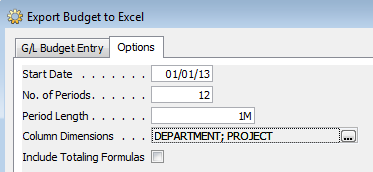
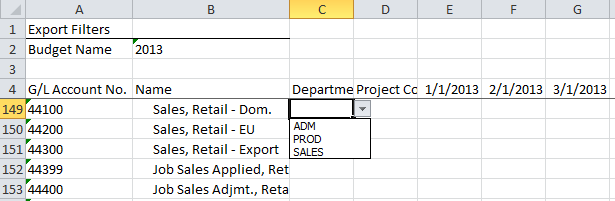
2. If you’re using dimensions, validate your data against the provided drop downs. Make sure all budget lines that use dimensions are only using valid dimension names. Any deviation from the allowable values that already exist in NAV can cause your budget load to error out or load without balancing.
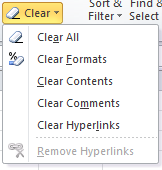
3. Clear the formats from your numbers. Once you’ve copied and pasted or typed your numbers into your Excel template, use the Excel “Clear Formats” function on all cells that contain a numeric value to make sure they are all returned to a formatted status of general. NAV does not accept any other format than the one in the template, and use of other formats, including use of commas in the numbers, will cause the budget tool to give an error and keep you from loading your budget successfully.
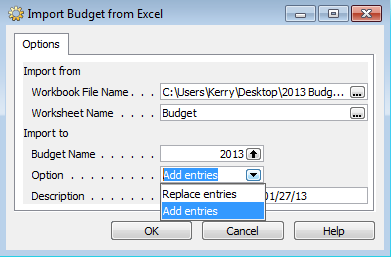
4. Use the “Add Entries” option for a brand new budget load and the “Replace Entries” option for a subsequent version. The add entries option should only be used for a brand new budget load, otherwise the entries will be added on top of the already existing entries, doubling or tripling them. If you need to load a second or third version or some type of correction, always use the replace entries option instead of the add entries option. If you really get stuck with a bunch of errors, the best thing you can do is delete your budget and reload from scratch.
Take one last look through your data to make sure it’s accurate and exactly what you expected. You can use the budget tool to do this, or even better, put together a quick account schedule that shows your entries using “G/L Budget Entries” instead of “G/L Entries”. Make sure to look at your total balances, balances by fiscal period, and balances with dimension filters applied. Once you’re satisfied that all your budgeted data has loaded correctly and completely, you’re ready to produce financial reporting showing actual versus budgeted numbers!
Blogiversary Top 20 (#17) Tis the (Budget) Season! Three handy NAV account schedule tips to get you through
Posted: April 5, 2013 Filed under: Uncategorized | Tags: Account Schedules, budgets, column layout, NAV, row setup, tips and tricks Leave a comment We’re celebrating our one year blogiversary by reposting the Top 20 Most Viewed in the last year, as determined by you, our readers! Follow this link to see the entire list. Enjoy!
I don’t know about your company, but my company is in full budget preparation mode. We’re working on getting our sales forecast and operating budgets put together in time for the end of year. Like most companies, we’re working on this predictive tool while we’re in the midst of finishing out the year, so of course, we get to make a few assumptions on how the year will end up. I don’t have a crystal ball, but I do have some pretty great account schedules that help folks at my company get a good solid look at where we ended up last year, what we planned for this year, and how we’ve done over a couple of years, and I’m going to share those three account schedule column layouts with you today. Hopefully these simple setups will give you some quick ways to wow your company and make their budget construction process easier.
Tip 1: Show 12 months of actual data
We ask our budget managers to give us a twelve month prediction, why shouldn’t we give them twelve months of data to work with? No matter what month you’ve just closed, you can quickly put together an account schedule that shows all of the completed months for the year (in this case, January-September) as well as October/November/December of the prior year. This way, if your activity is generally the same year over year, budget managers can get a quick gauge from this setup. Keep in mind this column layout isn’t dynamic, so it’s not a true rolling twelve months. For budgeting purposes, it’ll get you what you need.

Tip 2: Show 9 months of actual data and show what the plan is for the last three months of the year
Another way to provide a projection for the year is to show all the completed months for the year (again, January-September) and then show the budgeted plan for October/November/December. This method shows actual activity as well as three months of planned activity in order to project the total for the year. If activity this year is significantly different (higher or lower) from the year prior, you might depend on this view instead.

Tip 3: Show a whole bunch of history at a high level
Especially for sales forecasting, it sometimes gets difficult to look at too much data at once. One way to get past data analysis overload is to provide a few years’ worth of annual data. This column layout will give four years of data, helping you to compare not only year over year, but multiple year trending in your data.
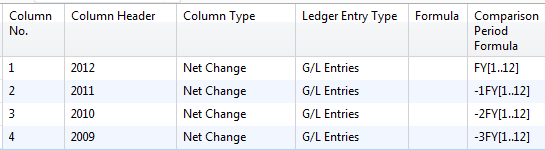
All three of these tips should give you a few additional tools to help you make sense of a whole lot of data. They can be applied to almost any row setup you have whether that setup is related to revenue or expenses. If you’re looking for more formulas, visit the account schedule formulas page.
Happy Budgeting!
Blogiversary Top 20 (#18) Learning about Microsoft Dynamics NAV 2013: on demand learning from NAVUG is a fantastic resource!
Posted: April 4, 2013 Filed under: Uncategorized | Tags: learning, NAV 2013, NAVUG, training, user group Leave a commentWe’re celebrating our one year blogiversary by reposting the Top 20 Most Viewed in the last year, as determined by you, our readers! Follow this link to see the entire list. Enjoy!
 As my company continues to move down the path to upgrading to NAV 2013, learning about the new version is high on our list of priorities. Yesterday, we gathered a group of 18 employees to view a webinar that had been recorded by the NAV user group (NAVUG). The live webinar had been done a month ago, but NAVUG records all of its webinars so user group members can view them on demand later.
I took the opportunity to view the webinar first to vet the material for appropriateness for our group. Being able to see the recording first allowed us to tailor the list of who we invited to view the webinar. Based on the content of the webinar, we invited NAV end users from the customer care, purchasing, finance, IT, warehouse, and marketing departments as well as our CFO and CEO. It was hugely convenient to be able to view the recorded webinar as a group because it allowed us to do this at a time that was convenient to us, we all got to consume the same learning experience at the same time, and we got a chance to discuss what we saw in the context of our own upgrade plans.
The webinar we viewed was titled “NAVUG 2013 Webinar Series: Microsoft Dynamics NAV 2013 – A Functional Preview” and we were excited to see some of the new charting and cash flow improvements, as well as to hear about dimension sets, database performance increases, and improved copy and paste. There were some smiles and ooh and aahs during the discussion of the web client and SharePoint clients for remote access and use of tablet technologies like the iPad and Surface. There was even a smattering of applause when the presenter showed some improved Excel integration features! Most importantly, all the people in the room got to pick up on the real world impact that NAV 2013 improvements will have on their jobs. Our company is still using the Classic Client, so for most of the people attending this was their first exposure to the Role Tailored Client and this webinar really got a lot of them thinking about what the “new” NAV would look like.
I can see already that NAVUG has two more sessions planned in their NAV 2013 Webinar Series. You can bet I’ll be viewing both of these, whether it is at the scheduled time for the webinar, or later, from the recorded session, and finding a way to share the info with other interested folks at my company.
NAVUG NAV 2013 Series: Introduction to ODATA Web Services: How to easily publish your NAV data 01/30/2013 11:00 AM (ET) NAV 2013 brings ODATA Web Services as a new way to access your NAV data from outside the system. Attend this session to find out how you can use ODATA to access your data from many other applications like Excel, SQL Reporting Services, Internet Explorer, smartphones and tablets.
NAVUG NAV 2013 Series: New Feature – Cash Flow 02/14/2013 09:30 AM (ET) We will demo how the new Cash Flow Forecast in NAV 2013 gives an efficient way to forecast short-term cash flow, enable better monitoring of cash receipts and cash disbursements and use the information to take preemptive steps.
For the cost of our annual corporate NAVUG membership, we were able to get 18 people at our company exposed to important concepts about the new version of the software that will be coming their way soon. We didn’t need to incur any travel costs or even any seminar registration fees, and we were able to schedule it at a time that worked for us. I know our company will continue to use the NAVUG library of recorded webinars as we continue to learn about NAV 2013. I hope you find this resource as useful as we have!
Blogiversary Top 20 (#19) The NAV accountant’s little helper: the reconciliation account check box
Posted: April 3, 2013 Filed under: Uncategorized | Tags: balance after posting, Classic Client, general ledger, journal entry, NAV, net change, posting test report, reconciliation account, RTC, tips and tricks Leave a commentWe’re celebrating our one year blogiversary by reposting the Top 20 Most Viewed in the last year, as determined by you, our readers! Follow this link to see the entire list. Enjoy!
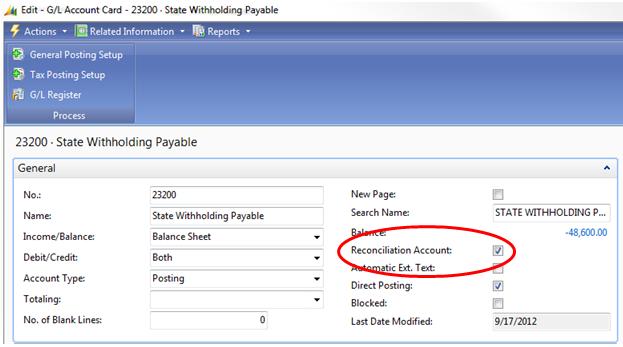
There’s a tiny feature in NAV that I take for granted. It’s there, in the background, hiding in the setup, and it helps me out just a little almost every time I make a manual journal entry. Especially if I’m in a bit of a rush, or distracted, this option gives me one more quick but effective look at what I’m doing before I commit a journal entry to my books permanently. This nifty little thing can be added to your NAV setup at any time without any help from IT and won’t require any maintenance. The option I’m talking about is the Reconciliation Account check box you can find on your general ledger account card. Here’s where you can find it:
Role Tailored Client
Classic Client
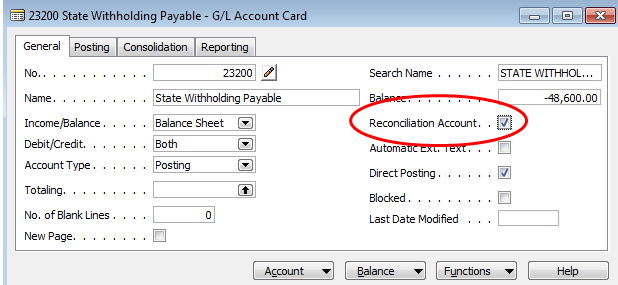
For any account where you’d like this additional double check, check the Reconciliation Account box found on the General Ledger Account Card. Now go put together your journal entry.

Instead of posting directly from the entry, choose Actions=>Posting=>Test Report=>Preview (if you’re RTC) or just choose Posting=>Test Report=>Preview (if you’re Classic). NAV will put together a handy dandy print preview which will now include a section at the bottom labeled Reconciliation. This little section will show you which direction your entry is going in, what sign your ending balance will be, and what the actual balance after posting will look like. This all happens before you commit it as final to the system. This may be just the extra bit of help you need in order to keep you from making an error. If you like what you see, post that journal entry!
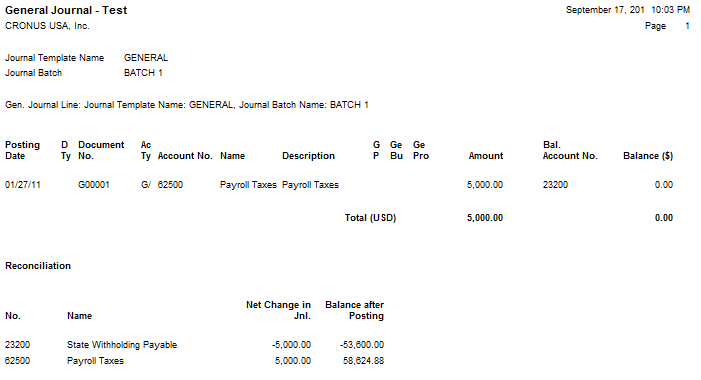
If you have an account where you’ve got a lot of daily activity, you may not find this as useful as you do with accounts with just a little bit of activity throughout the month because you’ll have a more frequently changing end balance. Decide what might be useful to you.
Next time you do a journal entry, give it a try. Go to the account card and check the box. Make your journal entry. Before you post, run the posting test report. Is the net change in your journal entry going in the right direction? Did you enter the correct account? Is your ending account balance the right sign? Most importantly, is the balance after posting what you expected? This little helper can give you a quick preview before you hit post and save you from having to reverse and correct an entry.
Blogiversary Top 20 (#20) Use show opposite sign to reflect net income correctly on an income statement using NAV account schedules
Posted: April 2, 2013 Filed under: Uncategorized | Tags: Account Schedules, financial statement, income statement, net income, show opposite sign, tips and tricks Leave a commentWe’re celebrating our one year blogiversary by reposting the Top 20 Most Viewed in the last year, as determined by you, our readers! Follow this link to see the entire list. Enjoy!
One of the concepts I see students in my NAV account schedules class get stuck on is exactly how to use the show opposite sign function when constructing an income statement. It can be a bit mysterious why it behaves the way it does, and it seems to defy the rules of accounting and basic arithmetic all at the same time. Once you understand why it works the way it does, you’ll know how to use it in the future. From the example shown here, we see a very basic income statement.
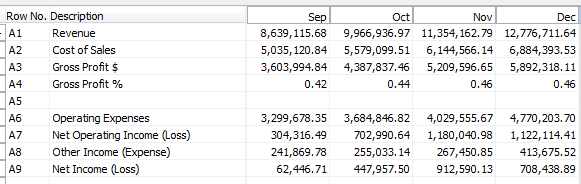
Without using any numbers yet, let’s all agree on some basic calculations:
Revenue – Cost of Sales = Gross Profit $
Gross Profit $ / Revenue = Gross Profit %
Gross Profit $ – Operating Expenses = Net Operating Income (Loss)
Putting these basic calculations into the design view for this account schedule gives the result below. Notice we’re not going to use the show opposite sign function yet, or make any changes to the basic formulas we just defined.
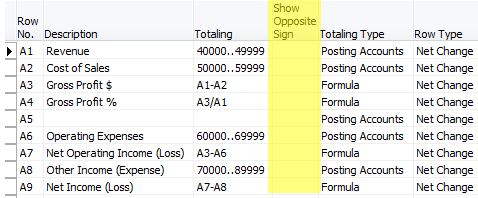
When we look at the report view for this account schedule we see that we’ve got a significantly wrong result. The revenue is showing as a negative number and all of the calculations below it are incorrect.
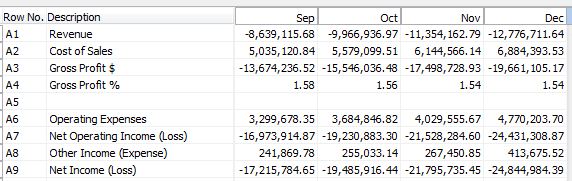
Now, for the accountants out there, you may already have guessed what the problem is. When accounting for revenue, these numbers are assigned a credit value, which shows up as a negative. Most financial statement end users want to see this reflected as a positive number. This is where we need to use show opposite sign. Let’s add that in to the design view, as shown below.
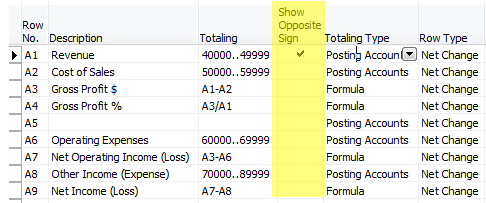
When we look at our new result, you would think all would be correct. We’ve corrected the accounting problem by flipping the sign. However, when you look at the result, we get the following.
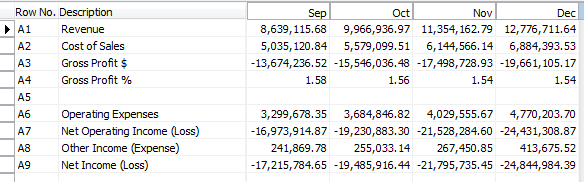
Why in the heck is that gross profit number not right? It seems we’ve got very simple math we’re dealing with here, what could be the problem? Many folks at this point go for the simple solution – just select show opposite sign on the gross profit $ line.
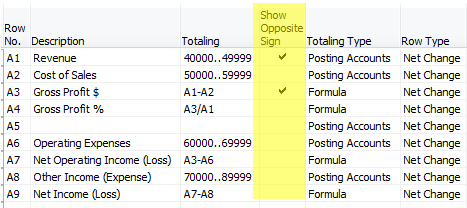
Unfortunately, this doesn’t work either, because you are flipping the sign on both the revenue value as well as the cost of sales value and you simply get the opposite of the same wrong number you got above.
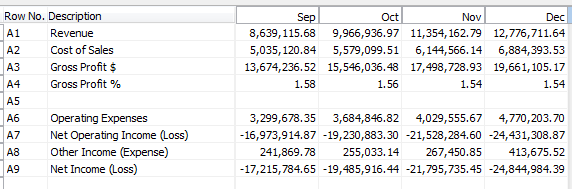
The reason this is happening is because the show opposite sign function is doing exactly what it says it is doing, it is SHOWING the opposite sign. This is really only a presentational mask, and when calculations are done against the value, revenue is still calculating as a negative number, even though it appears on your report as a positive number. This little bit of arithmetic defying programming can make an accountant a little cranky, but it is easy to solve with a little mathematic trickery. In order to fix this, we need to put into place a two part solution. The first part we already know; we must select show opposite sign for our revenue accounts. The second part manipulates the Gross Profit $ and Gross Profit % as shown below, changing the value of the revenue account within the equation in order to calculate correctly.
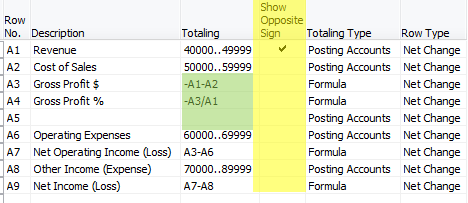
The end result gets us correct results every time.
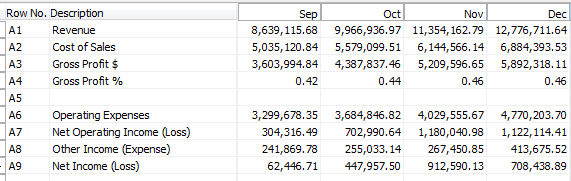
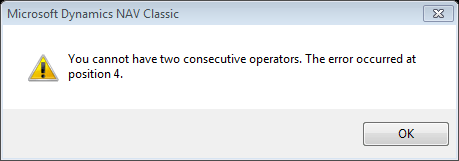
For those of you who are really paying attention, there is one more math mystery in the show opposite sign puzzle. Why have I chosen to show the calculation for Gross Profit % as -A3/A1 instead of simply using A3/-A1? Again, we’ve got to defy the programming with math tricks. Choosing A3/-A1 gives the error shown below. Get around it by moving the negative value to the other side of the equation and you’re good to go.
DynamicsNAVFinancials blog celebrates one year with top 20 postings
Posted: April 1, 2013 Filed under: Uncategorized | Tags: Account Schedules, budgets, Classic Client, Convergence, dimensions, Dynamics, Excel, export to excel, financial reporting, financial statement, general ledger, NAV, NAV 2013, NAVUG, payment terms, PowerPivot, tips and tricks, user group 2 Comments It’s our blogiversary! I started this blog in April 0f 2012, inspired by the number of NAV end users I had met over the last year who had the same questions that just weren’t getting answered. What better way to get that information out to folks than a blog where I could write up the topic in an easy to understand way?
You’ve shown your support! Over that last year, we’ve had over 15,000 views, almost 100 followers via email, have people following us on our new Facebook page, and know that many of you follow postings through the RSS feed. People from more than 120 countries are reading DynamicsNAVFinancials! The blog has gotten enough attention to be picked up for syndication through Microsoft Dynamics Community and I was even asked to participate as one of the eleven official bloggers at Microsoft Dynamics Convergence 2013 last month.
Special thanks has got to go to the NAVUG. The user group has been especially supportive of me and of the blog, finding opportunities for me to speak to NAV users in person, in webinars, online classes, and through this blog. Without the support of the user group this would have been a much longer road and I am so grateful for the constant work they have done to get me in front of as many readers as possible.
Publishing over an entry a week in the last year, there’s a lot to choose from, but in the month of April, I’ll be re-running the top 20 postings determined by the most viewed entries. Enjoy, and thank you so much for reading! There would be no reason to do this without you!
19 The NAV accountant’s little helper: the reconciliation account check box
18 Learning about Microsoft Dynamics NAV 2013: on demand learning from NAVUG is a fantastic resource!
17 Tis the (Budget) Season! Three handy NAV account schedule tips to get you through
16 Tips and tricks for a flawless budget load in NAV
15 Why NAV users should be using dual monitors
14 Video Demo: How to export NAV account schedules to Microsoft Excel
13 Basic row setup options for NAV Account Schedules
12 Aging methods in NAV – which buckets are you looking for?
11 Complete row setup options for NAV account schedules
10 Learning about Microsoft Dynamics NAV 2013
9 Where can I learn more about NAV analysis reports and analysis by dimensions?
8 10 easy tips for payment terms success in Microsoft Dynamics NAV
6 Getting started with a new account schedule
4 Maximize your Microsoft Dynamics NAV 2009 Classic screen space with user level configuration options
3 Basic column layout options for NAV Account Schedules
2 NAV keyboard shortcuts – Classic to RTC
1 The Account Schedules Formulas Page







 Dynamics NAV Financials