Basic row setup options for NAV Account Schedules
Posted: July 5, 2012 Filed under: Uncategorized | Tags: Account Schedules, balance at date, Classic Client, financial statement, net change, row setup, RTC, totaling type 1 CommentThe perpetual problem of the new NAV user is when you get started in a new area of the application, there are way too many options to choose from. How many times have you opened up a new form, only to find twenty or more columns displayed as the default, and many more lurking behind the show columns menu? While we appreciate having all options for all people at some point, new users can find this especially daunting when trying to just get started with something new.
I’ll show you which columns to choose in the row setup for account schedules as a beginning point, and go through some simple explanations of how they are used.
Fields to start with:
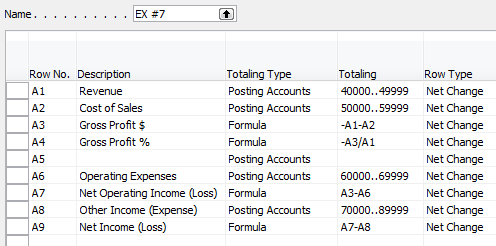
Row No. – The row number is completely optional, but highly recommended. This simple element of the row setup will eventually be one of the key features of your account schedule, allowing you to calculate and organize with ease.
Description – This is the one place you have to communicate, in words, what you’re showing on each line of your report.
Totaling Type: Posting Accounts or Formula – This field tells NAV what you’re going to do here. You’re either going to pull data from your general ledger posting accounts or calculate a formula.
Totaling – Which general ledger accounts you want to pull or what formula you want to calculate.
Row Type: Net Change or Balance at Date – The key here is knowing what type of accounts you’re reporting on. If you’re using income statement accounts (Revenue/Expense), then you need to use net change. If you’re using balance sheet accounts (assets/liabilities), then you need to use Balance at Date.
Shown below are both the design view and the user view of a summarized income statement, showing the use of these five options.
Role Tailored Client


Classic Client

This posting is one of the Top 20 Most Viewed in the last year! Follow this link to see the entire list.
Why I use NAV Account Schedules
Posted: April 25, 2012 Filed under: Uncategorized | Tags: Account Schedules, budgets, dimensions, Excel, financial statement, general ledger, NAV Leave a commentI use account schedules as the primary source of financial reporting at my company. With all the available choices out there, why do I use account schedules? I’ve got a whole list of reasons.
1) I can custom build all of my financial statements, exactly how I want to see them.
Especially when I talk with prospective NAV customers, I hear a lot of objections as to why NAV doesn’t come with “out of the box” financial statements. If you think about this for a bit, what part of your company’s financials might fit the definition of “out of the box”? Is your chart of accounts the same as someone else’s? What about the name of your accounts? Your numbering convention? Is the way you present your financial statements just like anyone else’s? If you built your financial statements using an out of the box solution, how long would it be before you began to customize them?
Why not build them the way you want them the first time and be able to customize them as your company changes?
2) Account schedules tie directly to the general ledger.
Someone told me once that reporting from the general ledger was the best way to get to the truth. Since my financial statements have got to be accurate and consistent above all else, I like this idea. I know, that without a doubt, my account schedules tie back to my trial balance and my detailed transactional postings. I can prove it out over and over. I can use my account schedules to debunk some of the untruths that come out of some of our other reporting sources. Knowing I can get to the truth makes me trust the results I get from account schedules and gives me confidence in deeming them as the place to get exactly the right answer.
3) Budgets integrate really well with account schedules.
I use the budgets area of NAV extensively. However, I only actually touch the budgets area once a year, when I populate them with our next years’ data. Budgets integrate to account schedules so fluidly that I have no reason to go back and forth between the two during the year as I track how we’re doing in comparison to budget or even as I look ahead to remind myself of what the plan was. I can get this information from account schedules and get all my financial information from one place.
4) Dimensions along with account schedules are a powerful combination.
Account schedules without dimensions are like James Bond without Q. James Bond can certainly hold his own without all the gadgets, but come on, the things that Q adds are really cool! Adding dimensions in almost as many combinations as you can think of gives you added power in your account schedules and lets you stretch beyond mere financial reporting and expand into operational reporting.
5) They export easily to Excel.
My monthly financial statement package is 18 pages, all produced out of account schedules. Each month, I export directly to Excel and produce reports that are consistently formatted and look the same every month. I’ve got good control over the process while still having the flexibility I need when we decide we want to make a change. All of this gets loaded up to SharePoint for the end users who use them, and no tree products are harmed in the production of our financials.
6) Account schedules can be built and maintained by finance folks without IT help.
This is, and always has been, the big seller for me. I’m a DIY kind of person. I do my own landscaping, I bake my own bread (not all the time), I can build a fire while camping, and I’m painting my own living room this spring. These same principles flow through to my business. I want to be able to do it myself. I love my IT colleagues, but goodness knows they have enough to do without having to produce my financials. Account schedules are easy enough to use that I don’t need to know a programming language, or how to accomplish a table join, in order to build them. All I need is knowledge of my chart of accounts, what the structure of my dimensions and budgets are, what the differences are between balance sheet and income statement accounts, and some simple formulas.







 Dynamics NAV Financials