The finance professional’s perspective on NAV dimensions (part 3 of 15)
Posted: March 13, 2013 Filed under: Uncategorized | Tags: dimensions, financial statement, general ledger, NAV, tips and tricks Leave a commentAs the finance person for your company who will make decisions about dimensions, you bring a unique perspective to how dimensions can be valuable in your accounting department. Some of the concerns you have will surround reporting requirements, some will pertain to consistency and control, and others will relate to efficiency. Let’s go through each of those concerns.
Efficiency
As a corporate controller, I’m concerned that my staff work in an efficient manner. In regard to coding invoices or general ledger entries, this means they shouldn’t need to look up a lot of information and they don’t engage in any more data entry than they absolutely have to. When choosing how dimensions will be set up in NAV, you can make some specific choices regarding how data can be populated. Do you want the coding to come in as a default value? Are your coding relationships rule-based enough to make that possible? Are there some things you can populate to always default so the coding appears as if by magic 100% of the time and an employee never needs to be responsible for making a coding decision?
Consistency and Control
In the same way that I’m a stickler about operating efficiently, I’m even more so about having consistency and control. If you ever work with me, at some point you will hear me say, “we do not allow optional data”. This means we don’t gather dimensions for some data and not for others. I use the default value code mandatory a lot in my system. This setting will force a dimension to be populated whether it is through a default value or by a person, but it will never allow the data to come through with a blank value, creating holes and reduced value data in my reporting.
Reporting Requirements
Ultimately, you’re using dimensions in your ERP system so you can get great reporting out of it to make important business decisions. As your company’s finance professional, you know what you’re reporting on now. Take a minute to think about that. Is what you’re reporting on still relevant or is it what you’ve always reported on? Has your business changed? Does your reporting need to change too? Think about what your business really needs to see in its reporting and structure your dimension choices to match.
Keep reading this month as we continue our series, 15 Days of NAV Dimensions.
5 reasons you need to use NAV dimensions (part 2 of 15)
Posted: March 12, 2013 Filed under: Uncategorized | Tags: accounts payable, dimensions, financial statement, general ledger, NAV, tips and tricks 1 Comment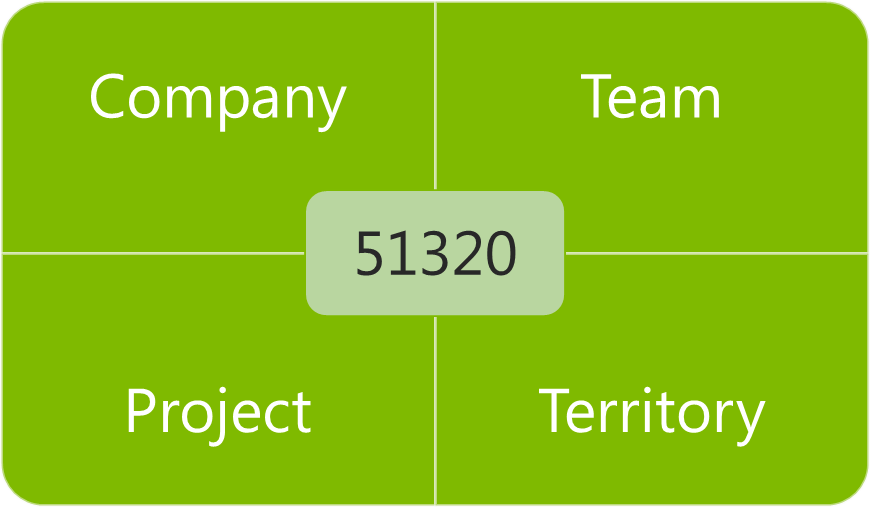 Still not convinced that leaving your old multi-segmented chart of accounts behind is a good idea? Don’t know exactly what in the world that crazy grid illustration with a number in only one box and words in the rest has to do with accounting, at all? Here are my five reasons for why you should be using dimensions.
1) Your chart of accounts is shorter. Seriously now, my company was the one with the 4,000 accounts in the chart of accounts before we installed NAV. We used project codes heavily, and had three to four segments to each base general ledger account number. Every member of the accounting team had this gigantic dog-eared book on their desk they would reference as they went through their day. Not only was it impossible to remember all that detail, it took a long time to type those numbers into the system, and with so many manually entered numbers, it was very easy to make a mistake. We spent a full two days every month during the close investigating and researching whether things went into the right place and then constructing reclassifying entries to correct the errors. My chart of accounts is less than 200 accounts now, and we eliminate a few more every year.
2) Account coding becomes intuitive. We still use project codes heavily, but now we’re able to give them a name as well as a number, which makes the coding process much more intuitive, less prone to error, and allows people outside the accounting department to enter data into the system. We work with a lot of non-numbers people at our company, and just talking about money has become easier since we started using dimensions. Nobody needs to get out the big dog-eared book to “determine the coding for your recent T&E”. We can use actual English and say things like, “Code that expense report to the Marketing team for the recent children’s sunday school event in Ohio” and everyone knows where that will be coded when the invoice gets entered to NAV.
3) Better control and accuracy. Certainly with having more intuitive coding and a shorter chart of accounts, we should all see some improvement in control and accuracy of postings. But wait, there’s more! NAV does a fantastic job of layering in more features for dimensions like allowing automatically populated default values, adding warning messages to make sure you get the right kind of dimension in the right place, allowing control at the level of your master data as well as your chart of accounts, and allowing restrictions on what dimensions can be combined with other dimensions and with what priority. All of these features combine to make sure the computer does the work instead of your employees and does it more accurately. Remember those two days my company used to spend to review and correct entries with reclassifications? Last year, I was able to send out an email out for three month end closes letting my team know they had a perfect posting month – no errors – not a single reclassification.
4) Greater flexibility in your reporting. Even with this shorter chart of accounts, we actually have more detail than we had before, because getting more detail through use of dimensions makes it possible. The idea of adding another segment in the old system to support a changing reporting need was heinously prohibitive. With dimensions, we gain that flexibility without adding another 400 pages to our chart of accounts. We produce more reports with more valuable information now than ever before, and we have the ability to combine the data we’ve gathered in more flexible combinations to assist us in making business decisions.
5) You’ll continue to have more options, even after go-live. I think a lot of people believe the only time they can make decisions about dimensions is when they are initially implementing. While this is a very important time to lay the foundation for your NAV system, you do have the option to add or change dimensions as you go along. We’ve actually added about one new dimension annually, as our business needs have changed, and as we’ve determined we need to report on different priorities.
Keep reading this month as we continue our series, 15 Days of NAV Dimensions.
4 questions to ask when deciding how to use NAV dimensions in your business (part 1 of 15)
Posted: March 11, 2013 Filed under: Uncategorized | Tags: chart of accounts, dimensions, NAV 1 CommentIf you’re just getting started with Microsoft Dynamics NAV for your business, you’ve probably heard the term dimensions, but you don’t really know what that means yet. You may be someone in the finance area for your company, or you may be an IT person. Eventually, at some point in your planning process, your partner is going to have “the talk” with you. This is an important talk, and it can be a little scary or even a little bit embarrassing, but it is absolutely necessary. The talk will probably start with, “have you thought about how you’ll clean up your chart of accounts”, or “we need to discuss how you will restructure your chart of accounts”, or “you could realize some serious efficiencies in your posting processes by reducing your chart of accounts”, or “holy cow, 4000 accounts is a whole lot, how do you remember all that?”.
Here are the four questions you should be asking yourself when deciding if you need to use dimensions at your company:
1) How long is your chart of accounts?
2) Do you recognize a number that looks like this? 01-810-51320-627539
3) How often do you answer this question? How do I code . . .
4) How many reclassifying entries are you making every month?
You might get the idea by now that using dimensions allows you to clean up your chart of accounts, reduce it in size, and increase your efficiency by doing so, and you would be exactly right. At its most basic, using dimensions will allow you to replace your old multi-segmented account numbers

with something that looks a little bit more like this.
Keep reading this month as we continue our series, 15 Days of NAV Dimensions.
15 days of NAV dimensions
Posted: March 11, 2013 Filed under: Uncategorized | Tags: Account Schedules, Convergence, CustomerSource, dimensions, Dynamics, NAV, NAV 2013, tips and tricks 1 CommentMarch Madness may mean basketball for some folks, but for me it means Convergence! Getting a chance to participate as a speaker at Microsoft Dynamics Convergence is a great opportunity to meet new NAV users I haven’t met before. I’m always looking to expand my network of knowledgeable professionals, and one of the ways I do that is by sharing information.
I’m lucky enough to be giving a concurrent session this year called Tips & Tricks for Working with Dimensions in Microsoft Dynamics NAV and I thought I would put together a series for the blog on the same topic to get the information out to a wider audience. For the next 15 days, there will be a brand new post on one of these dimension topics. Enjoy!
Day 1 4 questions to ask when deciding how to use NAV dimensions in your business
Day 2 5 reasons you need to use NAV dimensions
Day 3 The finance professional’s perspective on NAV dimensions
Day 4 Why finance and IT need to work in partnership on a NAV dimension strategy
Day 5 Viewing NAV dimensions on postings: where can you see them?
Day 6 NAV default dimensions and value postings applied to master data
Day 7 NAV default dimensions and value postings on the chart of accounts
Day 8 NAV dimension combinations for additional accuracy
Day 9 NAV dimension priorities
Day 10 Resolving NAV dimension errors
Day 11 NAV dimensions in account schedules
Day 12 NAV dimensions in budgets and consolidations
Day 13 Communicating to IT about NAV dimensions and NAV2013 dimension sets
Day 14 Add NAV dimensions as your business changes
Day 15 Learning more about dimensions from Microsoft Dynamics Customer Source
BONUS View Convergence 2013 session on Microsoft Dynamics NAV dimensions here
This posting is one of the Top 20 Most Viewed in the last year! Follow this link to see the entire list.
I’m presenting at Microsoft Dynamics Convergence 2013 in New Orleans!
Posted: February 11, 2013 Filed under: Uncategorized | Tags: Account Schedules, Classic Client, Convergence, dimensions, NAVUG, RTC, user group 1 Comment For those of you who are regular readers at DynamicsNAVfinancials.com, I wanted to let you know I will be presenting at Microsoft Dynamics Convergence 2013 in New Orleans, coming up in March. I’ll be doing a session on Account Schedules on Monday, a session on Dimensions on Thursday, and will be participating in sessions as a panelist for Ask Your Peers: Finance Professionals, as well as Ask Your Peers: Upgrade Experiences. More detailed session descriptions are below and are hosted by NAVUG. If you haven’t yet had the chance to connect with the NAV user group, check out this link on how to get engaged with NAVUG and the Dynamics NAV community at Convergence 2013.
If you’re attending Convergence, I’d love to meet you! Be sure to stop by and say hello!
Account Schedules in Microsoft Dynamics NAV: UBNAV04
Ask Your Peers: Finance Professionals: IDNAV01-R1
Ask Your Peers: Upgrade Experiences with Microsoft Dynamics NAV :IDNAV03
Tips & Tricks for Working with Dimensions in Microsoft Dynamics NAV:CSNAV08
Video Demo: How to export NAV account schedules to Microsoft Excel
Posted: February 5, 2013 Filed under: Uncategorized | Tags: Account Schedules, dimensions, Excel, export to excel, financial statement, learning, NAVUG, NAVUG Academy, training Leave a commentThere are some quick and easy ways to publish NAV Account Schedules to Microsoft Excel but some of them end up with some pretty ugly formatting unless you know a few secrets on how to make them look better. This short demo video shows you how to create a nicely formatted NAV Account Schedule in Microsoft Excel that only requires formatting the first time you set it up. Each time you replicate the report after that, you can simply update the report with new numbers and the formatting will remain the same every time.
While this demo shows how to create a financial report with three monthly tabs, you can easily extend this technique in a couple of different ways. I use this same technique to produce my monthly financial statement package. I have eighteen pages in the package I produce each month, and each page is a different account schedule. When I start a new month, I copy the Excel workbook and rename it with the new month, then use exactly this same technique to produce the new month’s reports. By using this technique, the new copied workbook acts as a “shell” to receive my new numbers. From month to month, I am able to maintain consistent formatting in my reporting while producing my financial reports in the most efficient way possible. I can apply the same principles to my monthly team budget reports. In this case, I can produce the same actual versus budget report over and over with a new dimension filter applied for each team, one per each Excel worksheet in the workbook.
If you’d like to learn more about account schedules, please visit my 2013 Classes page. This short video demo comes from my Account Schedules Basics class which I teach through NAVUG Academy. This class offering is just one of many classes that are being offered by NAVUG Academy in 2013 to help you get more out of your use of NAV at your company.
This posting is one of the Top 20 Most Viewed in the last year! Follow this link to see the entire list.
Expand your use of dimensions in NAV account schedules by using analysis views
Posted: October 2, 2012 Filed under: Uncategorized | Tags: Account Schedules, analysis views, budgets, Classic Client, codeunit 410, column layout, date compression, dimensions, Dynamics, Microsoft, NAV, row setup, RTC, update Leave a commentIf I had to pick only three basic elements to Microsoft Dynamics NAV account schedules, I’d have to choose row setups, column layouts and analysis views. Of course, row setups give you access to basic general ledger accounts and column layouts give you options on how to show that data in different time periods. So what do analysis views do for us? Analysis views give us the ability to reach into our dimensions, past the two globals, and into the list of shortcuts, allowing us to combine any four dimensions we want at a time in any account schedule.
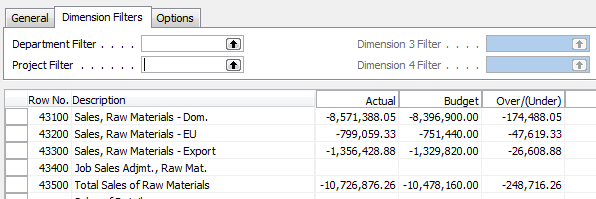
For illustration, I’m showing you an account schedule from NAV2009 Classic, which shows the dimension filters on an account schedule where no analysis view has been applied. The two global dimensions for CRONUS USA (Department and Project) are available to be selected on the dimensions filter tab and the remaining options are greyed out, unable to be used.
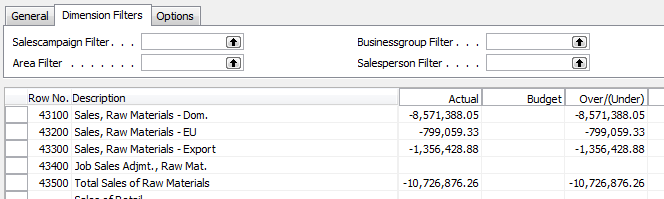
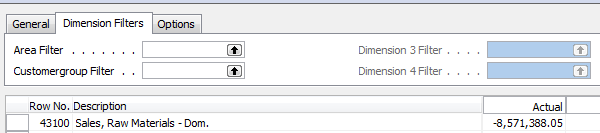
By selecting a different analysis view on the account schedule name page, you will have expanded options. Perhaps you’d like to apply an entirely different set of dimensions filters to your account schedule or limit the dimensions filters to only two of your shortcut dimensions. Any combination of four dimensions is available to you through analysis views.
There are a few things you need to know about analysis views before you start using them:
You can add a default analysis view to any account schedule. If you always want a certain account schedule to filter on a selected group of dimensions, this is the best way to do this.
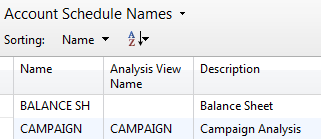
Analysis Views must be updated. You can do this at any frequency you wish. Some companies choose to update once a month, some companies update once a day. Be aware that the process of updating pulls in any transactions that have been posted since the last update to your analysis view. This means if you post some entries during your close process, you’ll need to update your analysis view in order to show the change on your account schedule.
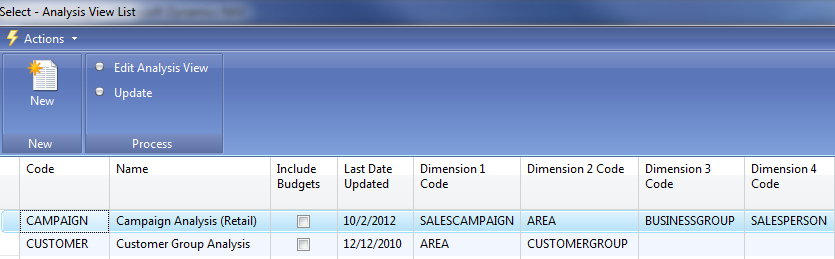
Updating can be done manually or it can be automated. To manually update analysis views, just hit the update button. You’ll need to do each one separately. Alternatively, you can choose to schedule codeunit 410 Update Analysis View as a regularly scheduled maintenance item in order to automate this process.
When you set up an analysis view for the first time, it can take a long time to update. Depending on the size of your database, if you don’t limit how far back your update goes, it could take a long time to update initially. Be careful by trying this out in a test system first. This process, which will normally take seconds when run daily, will take many hours if you don’t limit it and will cause table locks for other users.
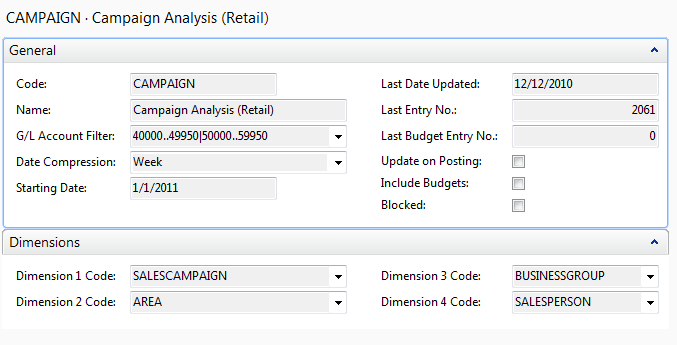
If you test out an update and are afraid it will take up too much processing time, you have a couple of options. First, you can limit the start date of your update. One reason you might need a new analysis view is because you’ve added a new dimension. In this case, you really don’t need to go back to the beginning of time on your update. Choose the date you started gathering data on your new dimension as your starting date. You can also choose date compression. By compressing your data by day, week, month, quarter, period, or year, you limit how much detail you can see when you drill down. If you use this option, you’ll need to remember that this is a compressed view if you change column layouts to different time frame than your compression setting. Choosing date compression of none will allow you to drill down to full transactional detail.
Avoid using the update on posting button. This option updates your analysis view every time you post something to your system. Every sales order, every sales tax entry, every cash receipt, etc. will update real time. I’ve seen one small company use this option and it brought their system performance to a crawl.
Remember to include your budgets. If you make any changes to your budgets, you need to update that information on your analysis views as well.
User Poll: How many NAV dimensions does your company use?
Posted: August 20, 2012 Filed under: Uncategorized | Tags: dimensions, NAV, user poll Leave a commentComplete row setup options for NAV account schedules
Posted: July 30, 2012 Filed under: Uncategorized | Tags: Account Schedules, balance at date, Classic Client, column layout, dimensions, Excel, export to excel, financial statement, general ledger, microsoft dynamics nav, NAV, net change, posting accounts, row setup, RTC, set base for percent, setup options, show opposite sign, totaling type, trial balance 1 CommentAbout a month ago, I published a post called Basic row setup options for NAV account schedules. This is a great place to look if you’re just getting started. However, if you’re looking for what else you can do with Microsoft Dynamics NAV account schedules, then this is where you want to be. This post will go through each and every field available on the account schedule row setup and talk about the available options. The functionality of these fields are exactly the same between the Classic and Role Tailored Clients. The only difference is in how they look on the screen and how you navigate between screens. Take a look at the pictures below to find the look you’re familiar with, but then keep reading for the explanations of what these fields will do in your financial reporting.
Role Tailored Client
This is a view of what I recommend you start with for basic row setup options.

This is a view of all available row setup options.

Classic Client
This is a view of what I recommend you start with for basic row setup options.

This is a view of all available row setup options.

Row setup options – apply to both clients
Row No. is completely optional, but highly recommended. This simple element of the row setup will eventually be one of the key features of your account schedule, allowing you to calculate and organize with ease.
Description is the one place you have to communicate, in words, what you’re showing on each line of your report.
Totaling Type: 6 options to choose from
- Posting Accounts pull data from your accounts designated as posting accounts on the G/L Account Card Account Type field.
- Total Accounts pull data from your accounts designated as a total or as an end-total on the G/L Account Card Account Type field.
- Formula allows you to calculate a basic formula on this row.
- Underline places a single underline .
- Double Underline places a double underline.
- NOTE: This nifty addition showed up with NAV 2009 R2. If you are NAV 2009 SP1 or earlier, this won’t be available to you.
- Both of the underline functions are there to give folks who print account schedules directly out of NAV some formatting options. If you’re exporting to Excel you’ve got some better format options to work with than these.
- Set Base for Percent allows you to designate which row from your row setup will be used as the beginning point for a section to be included in a percent of total calculation. This feature showed up in version 5.0 and must be used together with a formula on another row to designate the end point of the section as well as some setup in the column layout. It’s a little fussy in the setup and inelegant in execution, but is still effective to get those vital comparative percentages onto your account schedules.
Totaling will be which general ledger accounts you want to pull or what formula you want to calculate, depending on what you selected in totaling type.
Row Type: 3 options to choose from
- Net Change should be used, generally, if you’re reporting on income statement accounts (revenue/expense).
- Balance at Date should be used, generally, if you’re reporting on balance sheet accounts (assets/liabilities).
- Beginning Balance will be sparingly used, but you’ll want this for your statement of cash flows at some point.
Amount Type gives you three options: Net Amount, Debit Amount and Credit Amount. You’re going to use Net Amount almost all the time, but I suppose if you were getting very granular in your account schedules and perhaps using them for detailed reconciling reports, this might be useful. If I’m getting down to this level of transactional detail, I’m usually going to the chart of accounts instead of account schedules.
Formatting Fields: Bold, Italic, and Underline These basic formatting fields are there to allow you to emphasize some of the rows of your account schedules. When you select these options on any row, the whole row is effected. You are not able to effect a single “cell” for formatting. What’s the difference between underline here and underline found in the Totaling Type options? You can get a more snug fit on your underline using this option since it appears in the same row of your data instead of in a row if its own.
New Page inserts a page break. This is commonly used when separating the pages of the balance sheet showing assets on the first page and liabilities and equity on the second page. I have also seen it used when folks build multi page account schedules.
Show Opposite Sign is the option you can select to change revenue credit balances or expense debit balances to the opposite sign for the purposes of presenting this data in a more non-finance friendly manner. No salesperson wants to see sales presented with a negative sign; use this to change that credit to a positive number on your reporting.
Show allows you to designate if a row will show (the default) or be hidden on the printed account schedule only. You can click this box as much as you want, but your rows will still show on-screen or when you export to Excel. If you print directly out of account schedules, this feature will work very well for you.
Dimension Totaling is the last option available and you might have noticed that I didn’t show them on pictures above. This is because they are unique for just about every user, and depending on your analysis view setup, may even be different from schedule to schedule. You can use just one, or you can use all four of the available dimension totaling fields, in whatever combination you like. These fields act very much like the Totaling field because this is where you will tell NAV what Dimensions you want shown and totaled from your general ledger accounts.
This posting is one of the Top 20 Most Viewed in the last year! Follow this link to see the entire list.
Why I use NAV Account Schedules
Posted: April 25, 2012 Filed under: Uncategorized | Tags: Account Schedules, budgets, dimensions, Excel, financial statement, general ledger, NAV Leave a commentI use account schedules as the primary source of financial reporting at my company. With all the available choices out there, why do I use account schedules? I’ve got a whole list of reasons.
1) I can custom build all of my financial statements, exactly how I want to see them.
Especially when I talk with prospective NAV customers, I hear a lot of objections as to why NAV doesn’t come with “out of the box” financial statements. If you think about this for a bit, what part of your company’s financials might fit the definition of “out of the box”? Is your chart of accounts the same as someone else’s? What about the name of your accounts? Your numbering convention? Is the way you present your financial statements just like anyone else’s? If you built your financial statements using an out of the box solution, how long would it be before you began to customize them?
Why not build them the way you want them the first time and be able to customize them as your company changes?
2) Account schedules tie directly to the general ledger.
Someone told me once that reporting from the general ledger was the best way to get to the truth. Since my financial statements have got to be accurate and consistent above all else, I like this idea. I know, that without a doubt, my account schedules tie back to my trial balance and my detailed transactional postings. I can prove it out over and over. I can use my account schedules to debunk some of the untruths that come out of some of our other reporting sources. Knowing I can get to the truth makes me trust the results I get from account schedules and gives me confidence in deeming them as the place to get exactly the right answer.
3) Budgets integrate really well with account schedules.
I use the budgets area of NAV extensively. However, I only actually touch the budgets area once a year, when I populate them with our next years’ data. Budgets integrate to account schedules so fluidly that I have no reason to go back and forth between the two during the year as I track how we’re doing in comparison to budget or even as I look ahead to remind myself of what the plan was. I can get this information from account schedules and get all my financial information from one place.
4) Dimensions along with account schedules are a powerful combination.
Account schedules without dimensions are like James Bond without Q. James Bond can certainly hold his own without all the gadgets, but come on, the things that Q adds are really cool! Adding dimensions in almost as many combinations as you can think of gives you added power in your account schedules and lets you stretch beyond mere financial reporting and expand into operational reporting.
5) They export easily to Excel.
My monthly financial statement package is 18 pages, all produced out of account schedules. Each month, I export directly to Excel and produce reports that are consistently formatted and look the same every month. I’ve got good control over the process while still having the flexibility I need when we decide we want to make a change. All of this gets loaded up to SharePoint for the end users who use them, and no tree products are harmed in the production of our financials.
6) Account schedules can be built and maintained by finance folks without IT help.
This is, and always has been, the big seller for me. I’m a DIY kind of person. I do my own landscaping, I bake my own bread (not all the time), I can build a fire while camping, and I’m painting my own living room this spring. These same principles flow through to my business. I want to be able to do it myself. I love my IT colleagues, but goodness knows they have enough to do without having to produce my financials. Account schedules are easy enough to use that I don’t need to know a programming language, or how to accomplish a table join, in order to build them. All I need is knowledge of my chart of accounts, what the structure of my dimensions and budgets are, what the differences are between balance sheet and income statement accounts, and some simple formulas.







 Dynamics NAV Financials